







Blog

Venta del Prime Day 2026: ¡Ahorra hasta un 50% en la mayor oferta del año de HBADA!

Venta del Prime Day 2026: ¡Ahorra hasta un 50% en la mayor oferta del año de HBADA!

Si has estado esperando el mejor momento para mejorar tu oficina en casa o tu espacio de trabajo, tu paciencia acaba de dar frutos.

Del 23 al 26 de junio, HBADA lanza nuestra Venta Oficial del Prime Day, ofreciendo hasta un 50% de descuento en toda nuestra línea de sillas ergonómicas de oficina de clase mundial. Esto no es solo otra promoción: es oficialmente la mayor venta del año, con los precios más bajos garantizados, regalos exclusivos con la compra y grandes descuentos por niveles.

Ya sea que luches contra el dolor lumbar diario, busques mejorar tu postura o quieras maximizar tu productividad durante largas horas de trabajo remoto, este evento por tiempo limitado es tu oportunidad definitiva para invertir en tu salud física a una fracción del costo.

La Estrella del Evento: HBADA E3 Pro 2026

Ergonomía Premium que Supera a Competidores de Alta Gama de Más de $1,000

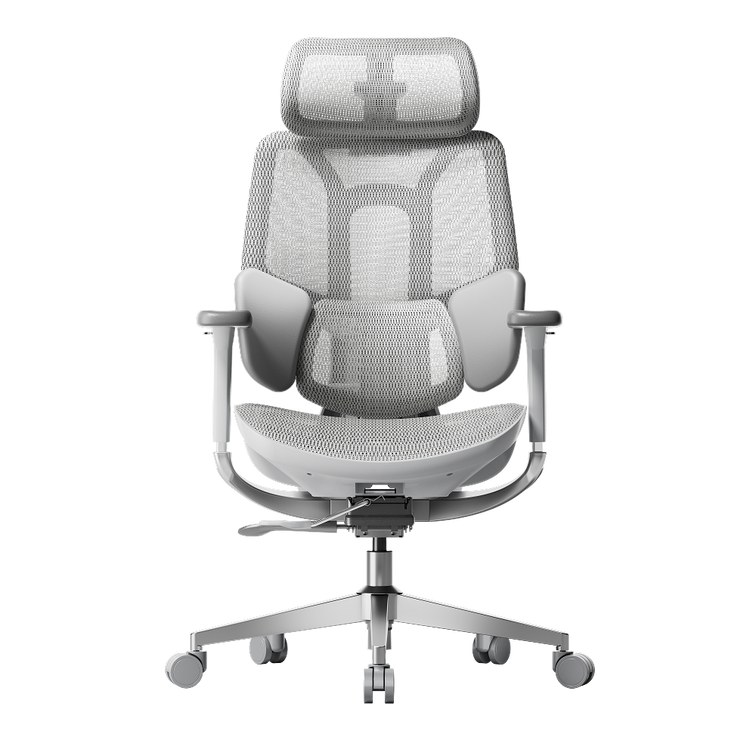
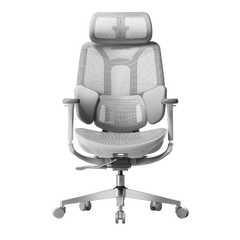
Mientras toda nuestra tienda presenta descuentos históricos, el foco está en nuestro modelo insignia: el HBADA E3 Pro 2026. Diseñado para profesionales que pasan más de 8 horas al día en su escritorio, el E3 Pro ofrece soporte espinal médico de primera calidad a un precio que revoluciona el mercado de sillas ergonómicas de lujo.

¿Por qué más de 10 millones de profesionales están obsesionados con la ergonomía HBADA? Aquí están los 4 avances clave del E3 Pro 2026:

  1. Soporte Lumbar Adaptativo de 3 Zonas No más ajustes manuales constantes. El sistema dinámico de 3 zonas se adapta y envuelve tu zona lumbar mientras te mueves, ofreciendo soporte localizado ya sea que estés inclinado hacia adelante para escribir o reclinado para relajarte.

  2. Reposabrazos Mecánicos 6D: Comodidad verdaderamente personalizable. Estos reposabrazos multidimensionales se ajustan hacia arriba y abajo, izquierda y derecha, adelante y atrás, y se inclinan dinámicamente para apoyar completamente tus codos y hombros, aliviando la tensión en la parte superior del cuerpo en cualquier posición.

  3. Alineación Avanzada de la Postura: Basado en la innovadora "Ciencia de Sentarse", el respaldo flexible imita la curva en S natural de la columna vertebral, previniendo activamente la fatiga por trabajo de escritorio y la mala postura a largo plazo.

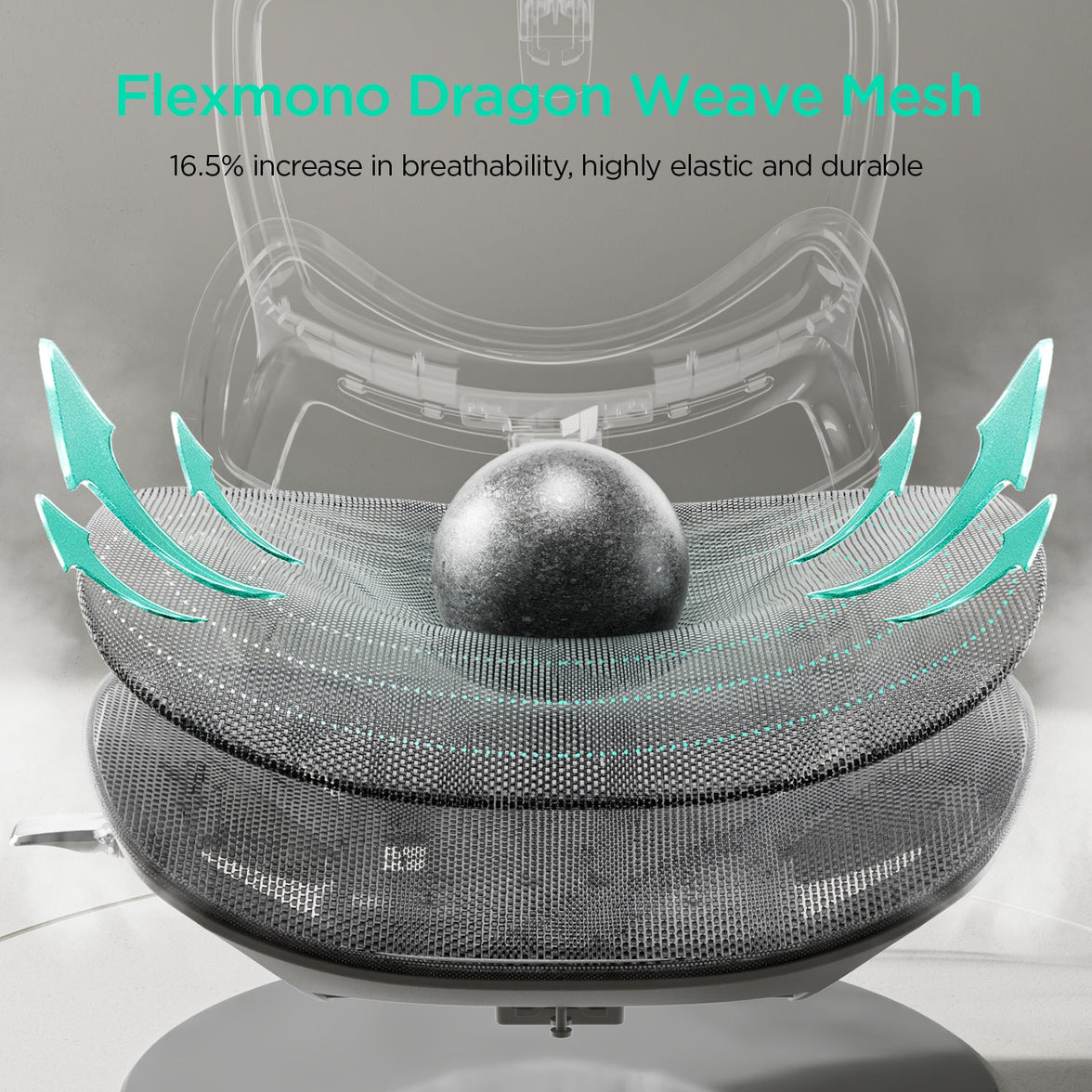
  4. Malla Transpirable y de Alta Elasticidad: Fabricada con material de malla de alta densidad premium que te mantiene fresco y sin sudor todo el día, mientras mantiene una resistencia robusta durante años.

Durante el pico del Prime Day, el E3 Pro 2026 estará disponible en Ofertas Relámpago exclusivas y promociones especiales. Si quieres experimentar el rendimiento de un modelo insignia de mil dólares sin el precio premium, esta es la silla que debes agregar a tu carrito desde el Día 1.

Mantén el Impulso: Repetición de la Venta del Prime Day

¿Te Perdiste el Pico? ¡Los Precios del Prime Day Continúan! (27 al 30 de junio)

¿No lograste conseguir tu silla favorita durante la agitada primera fase? No te preocupes.

Del 27 al 30 de junio, abrimos la Repetición de la Venta del Prime Day. Mantenemos los grandes descuentos, lo que significa que los Precios del Prime Day Continúan por cuatro días más. Aún puedes obtener hasta un 50% de descuento y aprovechar los cupones restantes antes de que se agote el stock de la temporada.

¿Por qué comprar el evento Prime Day de HBADA directamente en nuestra tienda?

  • Precio Más Bajo Garantizado de 2026: Si encuentras un precio más bajo este año, lo igualamos.

  • Descuentos Exclusivos por Niveles: Compra más, ahorra más. Cupones acumulables aplicados automáticamente al pagar.

  • Envío Rápido y Gratis: Enviado rápidamente para que puedas empezar a sentarte cómodamente la próxima semana.

No dejes que una silla de oficina mediocre afecte la salud de tu columna. Aprovecha el mayor evento del año, únete a millones de profesionales en todo el mundo y reclama tu comodidad premium hoy.

👉 [Haz clic aquí para comprar en la Venta del Prime Day ahora y ahorrar hasta un 50%]
Producto relevante

También te puede gustar

How to Adjust a Shared Ergonomic Office Chair for Hot Desking How to Adjust a Shared Ergonomic Office Chair for Hot Desking Dark reading mode A shared desk.A setup that is yours. Someone else’s chair settings do not have to become your working posture. A simple reset helps you make a shared ergonomic office chair fit your body before the day begins. One routine.Five adjustments. Seat height Seat depth Lumbar support Armrests Recline How do you adjust a shared ergonomic office chair? Start with seat height, then seat depth, lumbar support, armrests and recline. Check the desk and screen afterwards. Once you know the controls, aim for a quick one-minute check, taking longer whenever you need to fine-tune the fit. In this guide Why reset a shared chair? The adjustment order The 60-second reset What to look for Shared-chair hygiene HBADA chair comparison Limitations The takeaway Frequently asked questions Sources Why must you reset a shared chair? A hot-desk chair usually arrives set for whoever used it last. Their legs, back and arms may differ from yours, so the seat, lumbar support and armrests may not be in the right position for you. A seat that feels slightly too high or armrests that keep you away from the desk can become distracting over a full day. Resetting the chair gives you a better starting point than adapting your posture to someone else’s settings. EU-OSHA’s guidance on office ergonomics specifically discusses hot desking: shared workstations should be easy to adjust, and users need clear information about making those adjustments. Read the office ergonomics guidance. What order should you adjust the chair in? Start with the settings that establish your overall position. Seat height sets your relationship to the desk; seat depth determines how far back you can sit. You can then position the lumbar support and armrests around that foundation. Your reset sequence:Seat height → seat depth → lumbar support → armrests → recline → desk and screen check. At a height-adjustable desk, set the chair for supported feet and then bring the work surface to a comfortable working height. At a fixed-height desk, you may need to raise the chair to reach the keyboard comfortably and add a separate floor footrest. Use the sequence as a starting point, not a rigid rule. Recheck earlier settings if a later adjustment changes how you sit. The 60-second hot-desking reset Learn the controls first, then use these five steps as a quick daily routine. The aim is a repeatable setup—not finishing before a timer runs out. Set the seat height Sit back and position yourself so you can use the keyboard with relaxed shoulders. Keep your feet supported on the floor or a stable floor footrest. Avoid pressure from the seat edge under your thighs. Slide the seat to fit your legs Adjust the depth while keeping your back against the backrest. Leave roughly two to three fingers of clearance behind your knees as a starting point, then check comfort. Position the lumbar support Move the support towards the curve of your lower back. It should feel supportive rather than push you forwards. If the chair has automatic tracking, check the initial position and available settings. Bring the armrests to you Adjust the available height, width or rotation so your forearms can rest without lifting your shoulders. Make sure the armrests do not stop you moving close enough to the desk. Check the recline Lean back gently and familiarise yourself with the tilt lock. Adjust resistance if the chair offers a manual tension control; on an automatic mechanism, check that the movement feels controlled and supportive. Your final fit check Adjustment Aim for Quick check Seat height Comfortable access to the work surface Feet supported; shoulders relaxed Seat depth Thigh support with knee clearance You can sit against the backrest without pressure behind the knees Lumbar support Contact with the lower-back curve Support feels comfortable, not forceful Armrests Supported forearms and relaxed shoulders You can move close to the keyboard Recline Controlled, supported movement You understand the lock and resistance controls Floor footrest Foot support when the floor is out of reach Both feet rest securely without stretching down What makes a chair good for hot desking? A shared chair earns its place when different users can adjust it easily and understand how its controls work. Look beyond the number of features to how practical they are in daily use. A useful adjustment range: compare seat height, depth and width with the people using the space. One chair may not fit everyone. Clear, accessible controls: levers and buttons should be easy to identify and reach. Suitable build and service support: check intended use, maintenance needs, replacement parts and warranty coverage for the shared workspace. Practical materials: breathable mesh can help with airflow, but cleaning suitability depends on the material and manufacturer’s instructions. Appropriate capacity and dimensions: check both the weight limit and physical fit. A useful office addition: keep a simple adjustment card or a link to the chair’s instructions at each desk. Users should not have to guess which lever changes which setting. How do you keep a shared chair hygienic? Armrests, adjustment controls and headrests are frequent touch points. A consistent cleaning routine helps keep the chair pleasant for the next person. Follow the chair’s care instructions and your workplace cleaning procedure. Use a suitable cloth and a cleaner approved for the relevant surface. Do not assume every disinfectant is compatible with mesh, padding or finishes. Avoid soaking the seat or spraying liquid directly into controls, ventilation openings or electrical components. Allow cleaned surfaces to dry before the next use. Report spills, loose parts or damaged controls promptly. Remove an unsafe chair from use. Breathability and hygiene are different considerations: mesh allows airflow, but it still needs appropriate care. Which HBADA chair suits shared desks? The X7 and E3 Pro 2026 offer different approaches to lumbar support. Compare their adjustment ranges with your users, then decide whether powered tracking or mechanical adjustment better suits the workspace. HBADA X7 vs E3 Pro 2026: EU specifications Feature HBADA X7 E3 Pro 2026 Seat height 44.5–53 cm 46–54.5 cm Seat depth 40.5–45.5 cm 45–50 cm Seat width 52 cm 51.5 cm Lumbar support Powered automatic tracking 3-zone adaptive support; 60 mm height adjustment across six levels Seat material Breathable mesh CloudMesh Maximum weight capacity 150 kg 150 kg Recommended user height 150–195 cm 155–195 cm X7: powered lumbar tracking Consider the X7 if you want lumbar support that responds automatically to posture changes. Each user should still check seat fit, armrests and their preferred support settings. Explore HBADA X7 → E3 Pro 2026: mechanical adjustment Consider the E3 Pro 2026 if you prefer hands-on adjustment with adaptive lumbar support and a breathable mesh seat. Explore E3 Pro 2026 → Specifications refer to the linked EU listings. User-height ranges are a guide, not a substitute for checking fit. For office-wide purchasing, confirm shared or intensive use requirements and warranty terms before ordering. Limitations and when to get help A chair reset is one part of setting up a shared workstation. It cannot compensate for every desk, screen or individual fit issue. Check screen position, keyboard reach and available leg space after adjusting the chair. If the chair’s adjustment range does not fit you, ask for a suitable alternative rather than forcing a position. Change posture and take movement breaks throughout the day. Seek a workstation assessment if you cannot find a comfortable setup. For severe, persistent or radiating pain, consult a qualified healthcare professional. The takeaway: reset the chair, not your expectations Hot desking works better when you take a moment to make the workstation yours. Start with seat height, then work through depth, lumbar support, armrests and recline. Finish by checking the desk and screen. Choose powered lumbar tracking if that suits your workspace, or mechanical adjustment if you prefer a hands-on setup. Either way, learning the controls once makes every future reset more straightforward. Frequently asked questions How do you adjust an office chair for your body? Begin with seat height and depth, then position the lumbar support and armrests. Check the recline controls and finish by reviewing the desk and screen. Your feet should be supported, your shoulders relaxed and the seat clear of the backs of your knees. Is hot desking bad for your back? Hot desking does not automatically mean an uncomfortable setup. Problems can arise when the chair or workstation does not fit the user or is difficult to adjust. Familiarise yourself with the controls, review your fit and keep movement in your day. What should you look for in a shared office chair? Look for an appropriate adjustment range, clear controls, suitable seat dimensions and materials you can maintain according to the care instructions. Check intended use, weight capacity and after-sales support. Do not assume a single model will suit every colleague. How do you know a chair fits after resetting it? Check that your feet are supported, your thighs rest comfortably, there is clearance behind your knees and the lumbar support meets your lower back. You should also be able to reach the keyboard with relaxed shoulders. These are useful starting checks; reassess comfort as you work. Should a shared chair have a footrest? Some users need a separate floor footrest when a fixed desk requires a higher seat position. A retractable chair footrest is intended for supporting the legs while reclining and serves a different purpose. Choose support according to the user’s working position. Does automatic lumbar tracking adjust the whole chair? No. Automatic lumbar tracking responds to posture changes, but it does not replace checking seat height, seat depth, armrests or workstation fit. A new user should still run through the adjustment routine. Can you really reset a chair in 60 seconds? A familiar chair can be quick to check, but a minute is a practical target rather than a guarantee. Allow more time when using a new model, learning its controls or adjusting an unfamiliar desk. Sources EU-OSHA OSHwiki — Ergonomics in office work HBADA EU — X7 Smart Ergonomic Chair HBADA EU — E3 Pro Ergonomic Office Chair 2026 Edition How to Choose an Ergonomic Office Chair for 12-Hour Shifts How to Choose an Ergonomic Office Chair for 12-Hour Shifts  Dark reading mode A longer shift.A better way to sit. Choosing an ergonomic office chair for 12-hour shifts means looking beyond the first comfortable five minutes. Focus on support that follows your movement, a seat that fits and adjustments you will actually use. Support your work.Make room for movement. A well-adjusted chair belongs in your long-shift routine. So do standing up, changing tasks and taking short breaks. How do you choose an ergonomic office chair for 12-hour shifts? Prioritise adjustable lumbar support, a seat that matches your body, a useful recline range, breathable materials and a durable build. A retractable footrest can support your legs during reclined breaks. Pair these features with regular movement throughout your shift. 01 · Find your fit Seat height, depth and everyday comfort. 02 · Support your back Adjustability that works with your posture. 03 · Change position Upright work and supported reclined breaks. 04 · Keep moving Small changes across a demanding day. In this guide What matters most Dynamic lumbar support Posture variety Heat and seat pressure Long-shift checklist Your movement routine X7 or E3 Pro? Limitations The takeaway Frequently asked questions Sources What matters most for a 12-hour chair? Over a long shift, a small mismatch can become distracting. A seat that is too deep, armrests that push your shoulders upwards or lumbar support that sits too high may feel increasingly noticeable as the day goes on. Five things deserve particular attention: lower-back support, posture variety, heat and pressure management, build quality and freedom to move. Think of it as choosing an office chair for long hours, with extra emphasis on how the chair feels after your initial adjustment. Seat height: your feet should rest on the floor or a separate floor footrest without the seat pressing into the backs of your thighs. Seat depth: sit back against the backrest while leaving clearance behind your knees. Lumbar position: the support should meet your lower back rather than force you forwards. Armrest fit: support your forearms without lifting your shoulders or preventing you from moving close to the desk. Fit comes before extra features. A useful adjustment range matters more than a long list of controls that do not suit your body or workstation. Why does dynamic lumbar support matter over 12 hours? You rarely stay in exactly the same position throughout a shift. You lean towards the screen, settle back for a call and change position between tasks. Dynamic lumbar support is designed to respond to those movements rather than support only one fixed sitting position. The HBADA E3 Pro 2026 uses a 3-zone adaptive lumbar system with spring-based support and 60 mm of lumbar height adjustment across six levels. The HBADA X7 offers powered lumbar tracking that automatically responds to changes in posture. The practical question is not simply whether a chair has dynamic support. It is whether that support meets your lower back comfortably when you work and when you lean back. Adjust it gradually rather than assuming that the strongest setting is the best one. How does posture variety help on long shifts? No single sitting position needs to last for an entire shift. A useful recline range gives you more ways to sit between focused work, reading and short rest breaks. Both the X7 and E3 Pro 2026 offer recline up to 140° with four locking positions. An adjustable headrest helps you position support when leaning back, while a retractable footrest can support your legs during reclined breaks. Choose the footrest-equipped configuration where applicable. Keep your working posture matched to your desk and screen. A deep recline is more useful for a pause than for reaching forwards to type. Vary more than the chair angle. EU-OSHA resources encourage movement and changes of posture at work. Reclining adds variety, but getting up and walking remain part of the routine. Read EU-OSHA’s movement guidance . Why do heat and pressure matter after hours of sitting? Seat comfort is about both temperature and fit. Breathable mesh allows airflow, while appropriate seat depth helps support your thighs without crowding the backs of your knees. The E3 Pro 2026 uses a CloudMesh seat. The X7 combines breathable mesh with three-level fan-assisted cooling ventilation. This adds airflow around the seat for users who prefer a cooler sitting experience. Both models provide 50 mm of seat-depth adjustment. However, their actual seat-depth ranges differ: the X7 adjusts from 40.5 to 45.5 cm, while the E3 Pro 2026 adjusts from 45 to 50 cm. That difference is worth checking before choosing between them. Mesh and cushioned seats can both work well. Pay attention to how evenly the seat supports you, whether its front edge feels comfortable and whether you can sit against the backrest without sliding forwards. The 12-hour shift chair checklist Use this checklist to compare practical adjustments rather than relying on an “all-day comfort” headline alone. What to check before buying Feature Why it matters What to check Lumbar support Supports your lower back as your posture changes. Position, adjustment range and comfortable contact. Seat fit Helps you sit back without pressure behind the knees. Actual height, depth and width—not just user-height guidance. Recline Adds options for working and taking a supported break. Recline controls, locking positions and ease of use. Footrest Supports the legs during reclined breaks. Whether your selected chair configuration includes one. Breathability Allows airflow during longer sessions. Seat material and whether powered ventilation is included. Armrests and headrest Let you position support around your desk and tasks. Reach, clearance and adjustment directions. Build and capacity Help determine whether the chair suits its intended use. Maximum load, model-specific testing and maintenance instructions. After-sales support Makes repairs and ongoing ownership easier to plan. Warranty coverage, replacement parts and return conditions. How to build movement into a long shift A supportive chair works best as part of a varied working day. Build small changes into tasks you already do rather than saving all your movement for the end of the shift. Set up before you start. Adjust seat height, seat depth, lumbar support and armrests, then check your screen and keyboard position. Change position between tasks. Move between focused upright work and a more relaxed sitting position when the task allows. Take frequent movement breaks. Stand, stretch or walk when practical. A call, a refill of water or a change of task can provide a natural cue. Use recline for a supported pause. Lean back and use the retractable footrest if fitted. Treat this as an additional option, not a substitute for leaving the chair. Give screen-focused work a break. Look away from the display and alternate with tasks that do not require the same fixed viewing position. Recheck comfort mid-shift. If you start perching on the seat edge or reaching forwards, review your setup instead of simply tolerating it. For practical ideas, see EU-OSHA’s guidance on promoting movement at work . Which HBADA chair suits 12-hour shifts? The X7 and E3 Pro 2026 take different approaches to support. Start with their fit, then decide how much powered adjustment and additional comfort functionality you want. HBADA X7 vs E3 Pro 2026: EU model comparison Feature HBADA X7 E3 Pro 2026 Lumbar support Powered automatic tracking 3-zone adaptive; 60 mm height adjustment, six levels Recline Up to 140°; four locking positions Up to 140°; four locking positions Seat depth 40.5–45.5 cm 45–50 cm Seat height 44.5–53 cm 46–54.5 cm Seat width 52 cm 51.5 cm Heat management Breathable mesh and fan-assisted ventilation Breathable CloudMesh Extra comfort features Massage and heating Mechanical ergonomic adjustments Maximum weight capacity 150 kg 150 kg Recommended user height 150–195 cm 155–195 cm Choose X7 for powered comfort Consider the X7 if you want automatic lumbar tracking, cooling airflow, heating and massage alongside your ergonomic adjustments. Explore HBADA X7 → Choose E3 Pro for mechanical support Consider the E3 Pro 2026 if you prefer adaptive lumbar support, breathable mesh and hands-on adjustment without powered comfort functions. Explore E3 Pro 2026 → Specifications refer to the linked EU product pages. Check the selected model and footrest configuration before ordering; X7, X7 Air and X7 Prestige are not interchangeable. Limitations and when to get help A good chair supports your working position, but comfort also depends on your desk, tasks, movement and individual needs. A chair is not a medical treatment or a replacement for regular movement. Recommended user-height ranges are a starting point. Check actual seat dimensions and your proportions. For shared shift work or continuous workplace use, confirm that the intended usage is covered by the model’s specifications and warranty. If pain is persistent, severe or spreading, seek advice from a qualified healthcare professional rather than relying on chair adjustments alone. The takeaway: choose support you can adjust Choosing an ergonomic office chair for 12-hour shifts comes down to fit, responsive support and opportunities to change position. Breathable materials and a comfortable recline add useful options, but they work best when the chair is correctly adjusted to your body. Choose the X7 if powered lumbar tracking and additional comfort functions suit your routine. Choose the E3 Pro 2026 if you prefer mechanical adjustability and adaptive support. Whichever you choose, make movement part of the shift—not something you postpone until it ends. Frequently asked questions What kind of chair is best for long shifts? Look for adjustable lumbar support, a seat that matches your body, usable recline controls and comfortable materials. The best fit lets you sit against the backrest with supported feet and clearance behind your knees. Compare dimensions before deciding which extra features matter to you. Is it bad to sit for 12 hours? A 12-hour shift does not need to mean 12 hours of uninterrupted sitting. Break up seated work with movement, changes of activity and opportunities to stand or walk. A supportive chair does not remove the need for those changes. Do you need a footrest for a 12-hour shift? A retractable chair footrest can support your legs during reclined breaks. If your feet do not reach the floor while working upright at the correct desk height, a separate floor footrest serves a different purpose. Choose the type that matches your setup. Is mesh or a cushioned seat better for long shifts? Both can work well. Mesh allows airflow, while a cushioned seat offers a different sitting feel. Fit, support and comfort matter more than material alone. Test whether the seat supports your thighs without pressure behind the knees. How often should you take breaks on a long shift? Build frequent short movement opportunities into your work rather than staying still until one long break. EU-OSHA’s practical guidance suggests getting up for a microbreak at least every 20–30 minutes where feasible. Adapt your routine to your tasks and workplace arrangements. Does the X7 have cooling? The X7 offers fan-assisted cooling ventilation with three airflow levels. It moves air through the seating area for a cooler sitting experience; it does not use refrigerated air-conditioning. How does the E3 Pro 2026 differ from the X7? The E3 Pro 2026 centres on mechanical adjustment and adaptive lumbar support. The X7 adds powered tracking, ventilation, heating and massage. Their seat-depth ranges also differ, so compare fit as well as features. Sources Product details are based on HBADA EU listings. Workplace movement guidance is drawn from EU-OSHA resources. HBADA EU — X7 Smart Ergonomic Chair HBADA EU — E3 Pro 2026 Ergonomic Office Chair EU-OSHA — Get moving at work EU-OSHA OSHwiki — Promoting movement and exercise at work How HBADA Measures Office Chair Fit: Height, Depth, Width and Lumbar How HBADA Measures Office Chair Fit: Height, Depth, Width and Lumbar HBADA A better fit starts with you. Dark mode Don't fit the chair.Find the chair that fits. How to measure office chair fit: height, depth, width and lumbar support. Two people of the same height can need very different chairs. Start with four measurements to check whether your feet, thighs, hips and lower back will get the support they need. 4 Measurements. One personal fit. Match seat height, seat depth, seat width and lumbar adjustment to your body. A recommended height range is a starting point, not a comfort guarantee. Start measuring ↗ 01 / HEIGHT Seat height Keep your feet supported. 02 / DEPTH Seat depth Leave room behind your knees. 03 / WIDTH Seat width Give your hips enough space. 04 / LUMBAR Lumbar range Position your lower-back support. Fit basics Compare models Measure yourself Choose your chair Limitations Final checklist FAQs Sources Which measurements decide office chair fit? Fit is not one number. People of the same height can have different lower-leg lengths, thigh lengths and torso proportions. The chair's adjustment ranges need to work with those differences. Seat height affects how your feet meet the floor. Seat depth determines how much of your thighs the seat supports. Seat width provides space for your hips. Lumbar range helps position support against the inward curve of your lower back. These measurements narrow your options. Armrest spacing, desk height and how the seat feels under your weight also matter. An ergonomic chair can support a more comfortable working position, but it is not a medical treatment. 01 Seat height: start from the floor. Seat height is the distance from the floor to the top of the seat. The height you experience while sitting may differ slightly from an unloaded measurement because the surface can compress or flex. Start with your feet supported and your thighs approximately level. Check that you can reach your keyboard with relaxed shoulders rather than raising them to meet the desk. The HBADA X7 lists a seat-height range of 44.5–53 cm. The E3 Pro 2026 lists 46–54.5 cm. Both provide 8.5 cm of travel, but their minimum heights are different. Feet not reaching the floor? A stable under-desk footrest can help when you need to raise the chair to suit your desk. It is different from an extendable chair footrest used while reclining. HSE workstation guidance recommends providing a footrest where needed. 02 Seat depth: support without pressure. Seat depth describes the front-to-back seating space. Manufacturers may use different reference points, so look at the dimension diagram rather than the chair's overall depth. Sit fully back against the backrest. About two to three finger widths between the front edge and the backs of your knees is a useful starting check, not a precise measurement rule. Too deep, and you may slide forward to avoid pressure behind your knees, losing back support. Too shallow, and you may feel that too little of your thighs is supported. X7 lists a depth range of 40.5–45.5 cm, while E3 Pro 2026 lists 45–50 cm. Both have 5 cm of adjustment travel, but they do not offer the same minimum seating depth. 03 Seat width: room to sit naturally. Seat width is the usable space across the seat, not the overall chair width. Your hips need room without pressure from the seat frame or armrests. X7 lists a seat width of 52 cm; E3 Pro 2026 lists 51.5 cm. When comparing either chair with your body measurements, check the clearance between the armrests as well. A wider seat is not automatically a better fit. If the armrests are too far apart, you may have to move your elbows outward to reach them. Width and weight capacity answer different questions. A chair can support your weight while still being too narrow, too deep or too tall for you. 04 Lumbar range: height is only half the story. Vertical adjustment changes where support sits. Front-to-back movement changes how it meets your back. Start with the support at the small of your back. It should feel supportive, not push you forward or press into one uncomfortable point. X7: powered tracking, manual height X7 lists 45 mm of manual lumbar-height adjustment and 50 mm of powered front-to-back movement. Automatic tracking does not replace the manual height setting. E3 Pro 2026: mechanical adaptability E3 Pro 2026 lists 60 mm of independent lumbar-height adjustment and 80 mm of backrest-height adjustment. Its mechanical lumbar system also offers adaptive movement; it is not simply a fixed pad. HBADA fit measurements, side by side. The important distinction is between adjustment travel and the actual size range. Two chairs can offer the same amount of movement while starting at different heights or depths. Swipe sideways to see the full comparison. HBADA X7 and E3 Pro 2026: EU fit reference Measurement HBADA X7 HBADA E3 Pro 2026 Seat height 44.5–53 cm 46–54.5 cm Seat-height travel 8.5 cm 8.5 cm Seat depth 40.5–45.5 cm 45–50 cm Seat-depth travel 5 cm 5 cm Seat width 52 cm 51.5 cm Lumbar-height adjustment 45 mm, manually adjusted 60 mm independent adjustment Lumbar movement 50 mm powered front-to-back movement Mechanical adaptive support Recommended user height 150–195 cm 155–195 cm Maximum load 150 kg 150 kg Figures refer to the linked HBADA EU product specifications. Specifications and configurations may change. Confirm the exact edition before ordering; recommended height is a screening guide, not a guarantee of comfort. One tape measure. Six simple checks. Use a firm seat and the footwear you normally wear at your desk. Having someone help can make the measurements easier. Record your measurements in centimetres so they are easy to compare with the product specifications. Measure lower-leg height → seat height With your feet supported, measure from the floor to the crease behind your knee. Use this as a starting reference, then check your actual seated position. Measure thigh length → seat depth Measure horizontally from the back of your buttocks to the crease behind your knee. Allow knee clearance rather than choosing a seat that fills the entire distance. Measure seated hip width → seat width Measure the widest part of your hips while seated. Allow some room on both sides and check armrest clearance too. Find your lower-back contact point → lumbar height Sit back and position the support against the inward curve of your lower back. Contact and comfort matter more than a universal height setting. Relax your shoulders → armrests and desk Keep the keyboard close enough that you do not have to reach forward. Adjust the armrests so they support your arms without lifting your shoulders. Try everyday tasks → fine-tune the setup Type, use the mouse and lean back. A position that feels fine for a minute may need small changes during normal work. Change position and take breaks throughout the day. Which HBADA chair fits you best? Start with dimensions, then compare how the adjustments work. Neither automatic support nor a longer feature list can compensate for a seat that does not fit your body. Prefer powered lumbar tracking? Consider X7 if you prefer powered front-to-back lumbar tracking. Check the seat fit first, then set the manual lumbar height to suit your lower back. Explore HBADA X7 → Prefer mechanical adjustability? E3 Pro 2026 combines a sliding seat with separate backrest and lumbar-height adjustments. Compare its 45–50 cm seat-depth range with your thigh measurement before choosing a configuration. Explore E3 Pro 2026 → Still comparing options? Browse the HBADA EU office chair collection. Compare each model individually instead of applying one model's measurements to the whole range. What measurements cannot tell you. Dimensions do not guarantee comfort. Check the applicable return conditions before ordering and test normal work tasks after assembly. A footrest has a specific role. It can support your feet when the chair is raised for desk access, but it does not fix an excessively deep or narrow seat. Desk height matters. A height-adjustable desk may let you bring the work surface closer to your preferred seated position. Configurations can differ. Confirm the model year, seat dimensions, armrest clearance and selected footrest option on the EU product page. Do not push through pain as a fit test. Seek qualified healthcare advice for severe, persistent or radiating pain. A chair is not a medical treatment. Measure first. Choose second. Before buying, check that your feet can be supported, there is clearance behind your knees, your hips have enough room and the lumbar support can meet your lower back. Then consider the desk, armrests and adjustment method. X7 offers powered lumbar tracking; E3 Pro 2026 offers mechanical adaptive support and separate height adjustments. Choose the model that matches your body and working setup, rather than relying on height recommendations alone. Frequently asked questions What is the correct seat height for an office chair? There is no single correct height for everyone. Start with your feet supported, thighs approximately level and shoulders relaxed while reaching the desk. Your lower-leg measurement is a starting point; check the position while actually sitting. How do I know if my seat depth is right? Sit fully back. The seat should support your thighs without pressing behind your knees. About two to three finger widths is a practical starting clearance, not an exact rule for every body. Does seat width matter? Yes. Your hips need room without pressure from the frame, and the armrests should be reachable without spreading your elbows uncomfortably. Check usable seat width and armrest clearance, not just overall chair width. Does automatic lumbar tracking still need manual adjustment? Different directions of adjustment serve different purposes. On X7, powered front-to-back tracking does not replace the manual lumbar-height setting. Set the height to match your lower back first. Can one office chair fit different body sizes at home? Often, provided each person fits within the usable dimensions and adjustment ranges. Each user should reset the seat, lumbar support and armrests. Check the shortest and tallest users separately before buying a shared chair. Does the same adjustment travel mean two chairs fit the same? No. Adjustment travel describes how far a component moves, not where the range begins. For example, a chair with a lower minimum seat height may suit a different leg length even when both chairs offer the same vertical travel. Sources Health and Safety Executive: Working with Display Screen Equipment — general workstation and footrest guidance from the UK regulator, referenced here for practical setup advice, not as a statement of EU legal requirements. HBADA EU: X7 product specifications — model dimensions and adjustment details. HBADA EU: E3 Pro 2026 product specifications — model-specific dimensions, adjustments and recommended user range. This article provides general product-selection guidance. Refer to the current EU product information and assembly instructions for your exact chair.