











Blog

Can a Standing Desk Help with Haemorrhoids? A European Workstation Guide

Can a Standing Desk Help with Haemorrhoids? A European Workstation Guide

Updated July 29, 2026

Quick answer: A standing desk may help reduce long, uninterrupted periods of sitting, but it is not a treatment for haemorrhoids. A more realistic approach is to alternate between sitting, standing and walking while also addressing constipation, straining, hydration and dietary fibre.

A 2023 case-control study found that participants who reported sitting for five or more hours per day had higher odds of haemorrhoids and/or anal fissures than those who sat for less time. However, this observational study does not prove that sitting caused either condition, and it does not establish five hours as a universal medical threshold.

This guide explains what the available evidence can—and cannot—tell us about standing desks, prolonged sitting and haemorrhoids. It also covers practical sit-stand habits and the role a properly fitted ergonomic chair can play in a more comfortable European home or office workstation.

Medical disclaimer: This article provides general educational information and is not medical advice. A desk or chair cannot diagnose, prevent, cure or treat haemorrhoids. Rectal bleeding, severe pain, recurring symptoms or an unexplained change around the anus should be assessed by an appropriate healthcare professional in your country.

Why Desk Workers May Experience Haemorrhoids

~scene

Haemorrhoids, also known as piles, are swollen blood vessels inside or around the anus. Their exact cause is not always clear, and several factors may contribute to their development or aggravate existing symptoms.

Commonly cited contributing factors include constipation, straining during bowel movements, pregnancy, ageing, being overweight and regularly lifting heavy objects. Spending longer than necessary on the toilet may also increase pressure around the anal blood vessels.

The Possible Role of Prolonged Sitting

Long periods of uninterrupted sitting reduce opportunities for movement and may contribute indirectly to constipation, physical inactivity or discomfort around the pelvic area. However, prolonged office sitting should not be treated as the sole explanation for haemorrhoids.

Haemorrhoidal disease is multifactorial. Changing a desk or chair cannot address every contributing factor, and a person experiencing symptoms should not assume that their office chair is the direct cause.

What Does the Five-Hour Study Actually Show?

A 2023 case-control study published in the Sudan Journal of Medical Sciences compared 81 patients with endoscopically confirmed haemorrhoids and/or anal fissures with 162 matched controls.

Participants in the patient group reported an average of 5.99 sitting hours per day, compared with 4.0 hours among controls. Sitting for five or more hours per day was associated with an odds ratio of 3.68, with a 95% confidence interval of 2.1 to 6.47.

This is an association, not proof of cause and effect. The study combined haemorrhoids and anal fissures as an outcome and examined a specific population. It should not be interpreted as meaning that sitting for 4 hours and 59 minutes is safe or that passing five hours automatically causes haemorrhoids.

Source: Is Prolonged Sitting a Risk Factor in Developing Hemorrhoids and Anal Fissures?

Do Standing Desks Help Haemorrhoids?

~scene

A standing desk may help indirectly by breaking up prolonged sitting, but there is currently no clinical evidence that a standing desk treats or cures haemorrhoids. Its main benefit is behavioural: it makes it easier to change posture during the working day.

The available evidence and clinical guidance reasonably support the following points:

  • Less uninterrupted sitting: A height-adjustable desk can make it easier to alternate between seated and standing work.
  • More opportunities to move: Changing position can act as a reminder to walk, stretch or refill a glass of water.
  • Support for general bowel health: Regular physical activity can help reduce constipation, which may reduce straining during bowel movements.
  • No direct curative effect: A standing desk does not shrink haemorrhoids or replace appropriate self-care and medical assessment.

General clinical guidance focuses on keeping stools soft, drinking sufficient fluid, eating fibre, avoiding excessive straining and not spending longer than necessary on the toilet.

English-language clinical reference: NHS: Piles (haemorrhoids). EU readers should also follow the guidance of their own national health service or healthcare professional.

Why Standing All Day Is Not the Answer

Replacing an entire day of sitting with an entire day of static standing is not an ideal solution. Prolonged standing can contribute to foot and leg discomfort, fatigue and swelling in some people.

The more practical goal is frequent variation rather than searching for one perfect posture. A height-adjustable desk works best when it allows you to move between comfortable sitting, standing and short walking breaks.

The desk is therefore only one part of the workstation. The chair you return to should also fit your body and allow you to sit without excessive pressure behind the thighs or unsupported slumping.

A Practical Sit-Stand Routine for European Office Workers

There is no medically established sit-stand schedule specifically for haemorrhoids. The following routine is a practical starting point rather than a treatment protocol:

  • Try a flexible 45:15 rhythm: Sit for approximately 45 minutes, then stand or move for 10 to 15 minutes. Adjust the timing to your comfort, ability and work requirements.
  • Avoid uninterrupted sitting: Use calls, water breaks or routine tasks as prompts to change position.
  • Take short walks: A few minutes of gentle walking during the morning and afternoon adds movement without disrupting the entire working day.
  • Do not remain on the toilet unnecessarily: Avoid using a phone or reading material that encourages you to stay seated longer than needed.
  • Drink sufficient fluid: Hydration works together with dietary fibre to help keep stools soft.
  • Increase fibre gradually: Fruit, vegetables, whole grains, oats, pulses, nuts and seeds can contribute dietary fibre. A sudden large increase may cause bloating or discomfort.
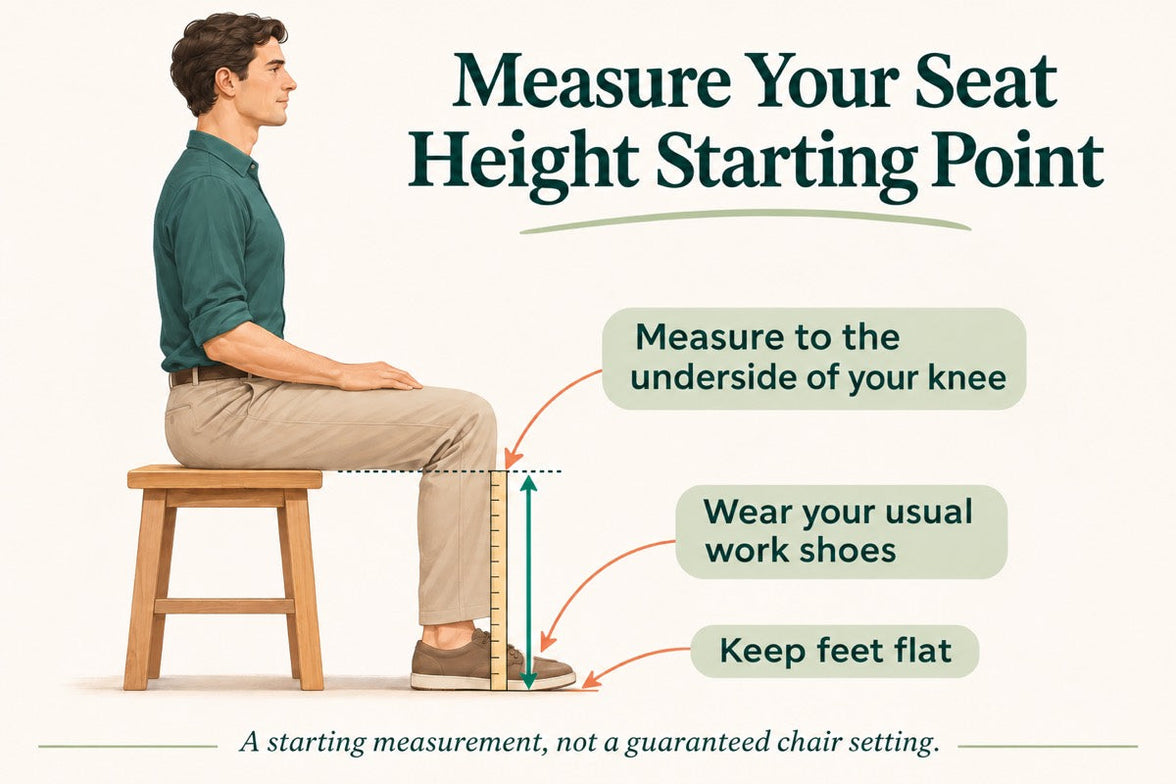
  • Use a properly fitted chair: Adjust the seat so that your feet are supported and the front edge does not press firmly into the backs of your thighs.

If you have a health condition that affects standing, circulation, balance, mobility or fatigue, consult an appropriate healthcare professional before making major changes to your working routine.

Why Your Chair Still Matters as Much as Your Desk

A sit-stand desk can reduce uninterrupted sitting, but most office workers will still complete part of the day while seated. During that time, a poorly fitted chair may create discomfort or encourage a slumped working position.

A suitable ergonomic chair should help distribute body weight across the seat, support the feet and thighs, and allow the backrest and armrests to be adjusted for the user and desk.

No chair can prevent or treat haemorrhoids. However, a well-fitted chair may make seated work more comfortable and make it easier to maintain a neutral working position.

When comparing chairs, look for:

  • A seat-height range that allows the feet to rest securely on the floor or a footrest
  • Adjustable seat depth with space between the seat edge and the backs of the knees
  • Lumbar support that aligns with the lower back
  • Armrests that allow the shoulders to remain relaxed
  • A recline mechanism that allows position changes
  • A breathable seat and backrest appropriate for the working environment

You can explore the current European models in the HBADA EU ergonomic office chair collection.

Two Illustrative Workstation Scenarios

The following examples are illustrative workstation scenarios. They are not clinical case studies or verified medical outcomes.

Scenario 1: A Professional Working Long Remote Shifts

Consider a remote professional who spends much of the day moving between focused computer work, video calls and administrative tasks. A chair with limited seat-depth, backrest or armrest adjustment may make it difficult to maintain a comfortable workstation.

Pairing a height-adjustable desk with the HBADA E3 Pro 2026 Edition provides a broad range of mechanical adjustments. The EU model includes three-zone adaptive lumbar support, adjustable seat depth, a height-adjustable backrest, a dual-axis headrest and highly adjustable armrests.

The current EU product information recommends the chair for users approximately 155–195cm tall and states a maximum weight capacity of 150kg. Users should still compare the complete dimensions with their own body and desk measurements.

Scenario 2: A User Who Frequently Changes Working Position

A user who moves regularly between upright typing, reclining and short rest periods may prefer a chair with responsive support and fine adjustment.

The HBADA X7 Smart Ergonomic Office Chair combines AI lumbar tracking with 5cm of seat-depth adjustment, a dual-axis headrest, adjustable armrests and an extendable leg rest. Selected configurations also include massage, heating and seat ventilation.

The EU product page recommends the X7 for users approximately 150–195cm tall and states a maximum load of 150kg. Its published seat-depth range is approximately 40.5–45.5cm, and its seat-height range is approximately 44.5–53cm.

Neither chair should be presented as a treatment for haemorrhoids, back pain or another medical condition. The purpose of these examples is to show how chair dimensions and adjustment ranges can affect workstation fit.

HBADA EU Product Comparison at a Glance

Feature HBADA E3 Pro 2026 Edition HBADA X7 Smart
Support system Three-zone adaptive mechanical lumbar support Powered AI lumbar-tracking support
Recommended height Approximately 155–195cm Approximately 150–195cm
Maximum stated load 150kg 150kg
Seat-depth adjustment Approximately 5cm Approximately 5cm; published range 40.5–45.5cm
Headrest 4D dual-axis adjustable headrest 4D dual-axis adjustable headrest
Armrests Highly adjustable 720° mechanical armrest system Highly adjustable 720° mechanical armrest system
Maximum recline Up to 140° Up to 140° according to the current EU configuration
Powered functions No battery required for normal adjustment AI lumbar tracking; selected configurations include massage, heating and ventilation
Best considered by Users who prefer extensive mechanical adjustment without battery maintenance Users who value responsive powered support and additional electronic comfort features

Specifications, configurations, prices and availability can change. Confirm all measurements and features on the relevant HBADA EU product page before purchasing.

When to Seek Medical Advice

Workstation changes are comfort-oriented measures, not medical treatment. Do not assume that rectal bleeding is caused by haemorrhoids without appropriate assessment.

Contact a doctor or appropriate healthcare service in your country if:

  • Your symptoms are getting worse or do not improve after trying appropriate self-care.
  • The symptoms keep returning.
  • You notice bleeding or a change around the anus that is not normal for you.
  • You are uncertain whether the symptoms are caused by haemorrhoids.
  • You have a high temperature, feel generally unwell or notice discharge.

Seek urgent medical assistance through the emergency service in your country if:

  • Bleeding does not stop.
  • There is a large amount of blood or large blood clots.
  • You experience severe pain, weakness, dizziness or fainting.

European emergency numbers and access routes can differ by country. The common EU emergency number is 112, but local medical services should be used according to the situation and national guidance.

Which Chair Should You Choose?

A standing desk can help break up prolonged sitting, but current research does not show that it cures haemorrhoids. A sensible workstation strategy combines posture changes, short walks and a properly fitted chair with evidence-based measures such as sufficient fluid, dietary fibre and avoiding excessive straining.

  • Consider the HBADA E3 Pro 2026 Edition if you prefer extensive mechanical adjustability, a three-zone lumbar system and no battery requirement for normal chair operation.
  • Consider the HBADA X7 Smart if you want AI lumbar tracking and value optional powered features such as massage, heating and seat ventilation.

The final choice should be based on your height, leg length, desk dimensions, preferred adjustment method and budget—not on medical promises.

For additional selection guidance, read the 2026 European ergonomic office chair buyer’s guide.

Frequently Asked Questions

Is standing or sitting better for haemorrhoids?

Neither prolonged sitting nor prolonged static standing is ideal. Alternating between comfortable sitting, standing and short walks can reduce uninterrupted time in one position. A standing desk may make these changes easier, but it does not treat existing haemorrhoids.

How long should you sit if you have haemorrhoids?

There is no clinically established maximum sitting time that applies to every person with haemorrhoids. As a practical measure, avoid long uninterrupted blocks and change position regularly if it is comfortable and safe to do so.

Does the five-hour study establish a safe sitting limit?

No. The study found an association between five or more reported sitting hours and haemorrhoids and/or anal fissures in one population. It did not establish a universal safe or unsafe daily sitting threshold.

Can an office chair cause haemorrhoids?

A chair by itself has not been established as a direct cause of haemorrhoids. Prolonged sitting may be one contributing factor, while constipation and straining are particularly important. A poorly fitted chair can cause discomfort, but an ergonomic chair should not be marketed as preventing or treating haemorrhoids.

Does walking help with haemorrhoids?

Regular gentle activity can support general movement and may help reduce constipation. Walking should be viewed as supportive self-care rather than a cure for haemorrhoids.

Does a standing desk cure haemorrhoids?

No. A standing desk changes how you work; it does not shrink or remove haemorrhoids. Persistent, recurrent, painful or bleeding symptoms should be discussed with a healthcare professional.

Should I use a cushion for haemorrhoids?

A cushion may improve comfort temporarily, but very soft or poorly supportive cushions can alter sitting posture. Seek medical advice for persistent symptoms rather than relying on a cushion or chair modification alone.

What is a practical desk setup for someone with haemorrhoids?

A practical setup includes a height-adjustable desk, a chair that fits the user, supported feet, suitable seat depth and regular opportunities to stand and walk. Workstation changes should be combined with appropriate self-care and medical advice when needed.

Final Thoughts

A height-adjustable desk may help reduce uninterrupted sitting, but it is not a medical treatment for haemorrhoids. The most realistic strategy is to vary your working position, take short movement breaks, avoid unnecessary time on the toilet and follow appropriate dietary and medical guidance.

When seated, choose a chair whose height, depth, backrest and armrests can be adjusted to your body and workstation. Explore the HBADA EU ergonomic office chair collection and compare the published measurements before deciding.

Gerelateerd product

Dit vindt u misschien ook leuk

How to Test an Ergonomic Office Chair During a 30-Day Home Trial How to Test an Ergonomic Office Chair During a 30-Day Home Trial The quick answer To test an ergonomic office chair during a 30-day home trial, use it for your real work each day and check fit, lumbar support, breathability, recline, armrests and noise. Keep the packaging, avoid damage, and decide before the window closes. If the chair does not suit you, contact support early enough to complete the required return steps within the applicable deadline. Table of Contents Jump to the part of the trial you need. 01. What is a 30-day home trial? 02. How should you set up the chair? 03. What should you test in week one? 04. What should you test in weeks two to four? 05. How do you protect return eligibility? 06. What are your EU return rights? 07. Which HBADA chairs can you test? 08. Your 30-day test plan 09. Limitations and when to get help 10. Conclusion 11. Frequently asked questions 12. Sources and useful links What Is a 30-Day Home Trial and How Does It Work? A home trial is a return window that lets you assess the chair in your real setup. HBADA EU’s current return and refund policy provides a 30-day satisfaction guarantee from receipt, subject to its terms. This commercial offer does not limit your statutory consumer rights. This gives you time to judge an adjustable ergonomic chair at your own desk, not in a showroom. Testing may help you find a more comfortable sitting position, but it is not a medical treatment. How Should You Set Up the Chair for Testing? Start well, because a fair test needs a proper setup. Assemble the chair using the HBADA user manual and assembly guide, and keep every part of the packaging, including the box, foam and spare hardware. Then set it to your body before you judge it. Set the seat height so your feet rest flat on the floor or a suitable footrest. Set the seat depth so two to three fingers fit behind your knees. Set the lumbar support to meet your lower back. Set the armrests so your forearms are supported and your shoulders stay relaxed. Check that you can reach your keyboard and mouse comfortably. Only after this setup should you decide how the chair feels. What Should You Test in the First Week? Your first week is about first impressions and daily fit. Fit: Check you can reach a feet-flat, back-supported position within the chair’s adjustment ranges. Lumbar support: Notice whether the support meets your lower back through your normal workday. Breathability: Watch for heat build-up and check whether the mesh and seat feel comfortable in your room. Noise and castors: Roll across your floor and listen for creaks or scuffs. Check that the castors are suitable for the surface. What Should You Test in Weeks Two to Four? Later weeks reveal how the chair holds up over real work. Now test the chair as an office chair for long hours. Work a normal week, keeping your usual movement breaks, and notice whether early comfort lasts into the afternoon. Move through the available recline positions and check that the locks hold. Use the armrests while you type, write and relax. Give yourself time to learn the controls and fine-tune the settings, but do not treat pain as a required adjustment phase. If discomfort eases after a setting change, note what helped. If it persists after reasonable adjustments, the chair may not fit you. A Quick Test-and-Decide Table Use this table to turn each check into a clear next step. What to test How to test it Keep or return signal Fit Set seat height, depth and lumbar support to your body, then sit back fully. Consider a return if you cannot achieve supported feet and back within the adjustment ranges. Lumbar support Use it during a normal working day and note lower-back comfort. Consider a return if the support cannot meet your lower back comfortably after adjustment. Breathability Check for heat build-up during ordinary work sessions. Consider another material or model if the seat consistently feels too warm for you. Recline and lock Try the recline settings according to the manual. Stop using the chair and contact support if the recline is unstable or a lock fails. Armrests Type, write and relax while checking forearm support. Consider a return if the armrests prevent a relaxed working position or access to your desk. Noise and castors Roll gently across a suitable floor surface and listen for persistent noise. Contact support about recurring creaks or floor marking before continuing use. Long-session comfort Work a normal week in the chair, with movement breaks. Reassess the fit if discomfort persists after you fine-tune the settings. How Do You Protect Your Return Eligibility? Test thoroughly, but handle the chair carefully while you decide. Keep the original box, foam and hardware for the whole trial. Keep the chair clean and unmarked, and use a suitable floor mat if needed. Note your delivery date and the relevant return deadlines. Contact support early if you are unsure, rather than on the final day. For its commercial guarantee, HBADA EU recommends retaining the original packaging and specifies condition requirements. Missing or inadequate packaging may lead to fees under that policy, subject to mandatory consumer law. These commercial terms do not override statutory withdrawal rights. What Are Your Rights If You Want to Return It? The 30-day commercial offer and your statutory right of withdrawal are separate. For most online purchases from a trader in the EU, you normally have 14 days from delivery to notify the seller that you wish to withdraw, followed by another 14 days to send the goods back. Exceptions apply. The statutory withdrawal period allows inspection of the product. Handling beyond what is necessary to establish its nature, characteristics and functioning may result in a deduction for diminished value. Keeping the original packaging is practical, but losing it does not automatically remove your statutory right. A commercial trial does not turn the statutory 14-day notification period into 30 days. If you want to use your statutory right, notify the seller within the applicable legal deadline. See the EU guidance on returns and withdrawal for details. Warranty coverage is also separate from a change-of-mind return. Refer to HBADA EU warranty and service information for product support after purchase. Which HBADA Chairs Can You Test at Home? If you are considering the HBADA X7 or E3 Pro 2026, check the current EU product page and the return terms for your order before purchasing. Use the same testing checklist for either chair, but pay attention to the features that make each model different. What to compare HBADA X7 HBADA E3 Pro 2026 Lumbar support Test how the AI lumbar-tracking system responds when you change position. Test how the three-zone adaptive lumbar support fits your lower back. Seat fit Check the selected model’s seat dimensions and adjustment range against your body and desk. Check the selected model’s seat dimensions and adjustment range against your body and desk. Recline and armrests Check support and control access while typing, leaning back and relaxing. Check the headrest, armrest and recline adjustments during your usual tasks. Additional features Try the comfort functions included with your selected version, following its manual. Focus on mechanical adjustments, mesh comfort and any optional footrest. Before ordering Confirm the exact configuration, delivery availability, return conditions and warranty. Confirm the exact configuration, delivery availability, return conditions and warranty. If you want automatic lumbar tracking, explore the HBADA X7 smart ergonomic chair and check the comfort features included with your selected version. If you want a mechanically adjustable chair to test for long workdays, compare the HBADA E3 Pro 2026. You can also browse the HBADA ergonomic office chair collection before your trial begins. Your 30-Day Test Plan Follow this simple plan so nothing is missed before the commercial trial ends. Keep the separate statutory withdrawal deadline in mind if you intend to use that right. Day 1 Assemble and Adjust Assemble by the manual, keep all packaging, and set the chair to your body. Days 2–7 Check Daily Fit Test daily fit, lumbar support, breathability, noise and castors. Days 8–21 Test Your Normal Work Routine Work your usual schedule and test recline, armrests and long-session comfort. Keep taking movement breaks. If you wish to exercise the statutory withdrawal right, do not wait beyond its notification deadline. Days 22–27 Fine-Tune and Decide Fine-tune settings and review your notes. If you are continuing under the commercial trial and the chair is not right, contact support now to confirm the return steps and deadline. Days 28–30 Complete Your Decision Keep the chair if it fits your needs, or complete the steps required under the commercial return policy within the applicable deadline. Do not assume contacting support on day 30 automatically extends the window. Limitations and When to Get Help A trial answers many questions, but not every one. A trial checks comfort and fit for you; it cannot promise a health outcome. Thirty days cannot establish the chair’s lifespan or long-term durability. Keep the chair and packaging in good condition while deciding. Commercial return terms and warranty coverage may vary by market and order. Mandatory consumer rights remain unaffected. If you have severe, persistent or radiating pain, consult a qualified healthcare professional. A chair is not a medical treatment. Conclusion The best way to judge an ergonomic office chair is to test it where you actually work. Assemble it, set it to your body, use it for real tasks, and keep the packaging until you are sure. Compare the X7 if you want automatic lumbar tracking, or the E3 Pro if you prefer mechanical adjustments. Make your decision before the relevant deadline, and keep the chair that fits you. Frequently Asked Questions How long is the HBADA EU home trial? HBADA EU currently offers a 30-day satisfaction guarantee from receipt. Check the applicable policy for the return procedure. It is separate from your statutory withdrawal right. Can you return an office chair after using it? Check whether you are returning under the commercial trial or exercising a statutory right. The conditions differ. Keep the chair clean, avoid damage and retain its packaging while deciding. How long does it take to get used to a new ergonomic chair? There is no fixed adjustment period for everyone. You may need several sessions to learn the controls and fine-tune the seat height, depth, lumbar support and armrests. Change one setting at a time. Do not keep sitting through pain in the hope that you will eventually adapt. Who pays for return shipping? Under HBADA EU’s commercial policy, change-of-mind returns involve a customer contribution to shipping, while damaged, defective or incorrect items are handled at HBADA’s shipping expense. Confirm the process before booking a courier; statutory rights remain unaffected. What should you check before the trial ends? Confirm the essentials: fit, long-session comfort, lumbar support, breathability, recline, armrests and noise. Also check that the chair suits your desk height and floor. Decide early enough to meet the deadline for the return route you are using. Sources and Useful Links HBADA EU Return and Refund Policy HBADA EU Warranty and Service HBADA User Manuals and Assembly Guides HBADA X7 Product Details HBADA E3 Pro 2026 Product Details Your Europe: Returns and the Right of Withdrawal How to Clean a Mesh Ergonomic Office Chair Without Damaging the Material How to Clean a Mesh Ergonomic Office Chair Without Damaging the Material Safe, simple care for mesh, spills, stains, casters and smart-chair components. Quick answer: Remove dust with a soft dry cloth or a vacuum on a low setting. Blot spills with a well-wrung cloth and mild soapy water, then let the mesh air-dry naturally. Avoid bleach, hot water, solvents and abrasive cleaners. Contents What can damage mesh? How to remove everyday dust How to clean spills and stains Frame, armrests and casters Cleaning methods at a glance How to clean a smart chair Safe deep-clean routine HBADA chair care FAQs What Can Damage a Mesh Chair? Mesh is designed to breathe and flex, but it can be damaged by unsuitable cleaning methods. Bleach, strong chemicals, solvents, hot water and abrasive cleaners can weaken or discolour the fibres. Stiff brushes and hard scrubbing can also snag or stretch the weave. Keep the chair out of prolonged direct sunlight, do not soak the mesh, and avoid spraying liquid directly onto it. Regular light cleaning is safer than occasional heavy cleaning. How Do You Clean Everyday Dust? Use a soft dry cloth Wipe the mesh with a dry microfiber cloth to remove surface dust, lint and light debris. Vacuum on a low setting If dust is caught in the weave, use gentle suction and move across the surface without pressing into it. A short weekly clean helps prevent dust and skin oils from building up, particularly when the chair is used every day. How Do You Clean Spills and Stains? For a fresh spill, dampen a soft cloth with mild soapy water and wring it out well. Blot the area from the outside of the mark toward the centre so it does not spread. Do not soak the mesh or scrub hard. For a stubborn mark, test an alcohol wipe on a hidden area first, then dab gently. Let the chair air-dry completely in a ventilated room before use. How Do You Care for the Frame, Armrests and Casters? Use a separate soft, damp cloth for the frame, armrests and base. Keep water away from the gas lift, recline mechanism and other moving parts. Never attempt to open the gas cylinder. Casters can collect hair and dust over time. Remove anything wrapped around the wheels, then wipe them clean so the chair can move smoothly. Cleaning Methods at a Glance What to Clean Safe Method What to Avoid Everyday dust Soft dry cloth or low-suction vacuum Hard brushing or scratching the mesh Fresh spills Blot with mild soapy water Soaking or rubbing the mesh Stubborn marks Spot-test, then dab gently Bleach, hot water or solvents Frame and armrests Soft damp cloth Abrasive or harsh cleaners Casters Remove hair and debris, then wipe Forcing debris deeper into the wheel How Do You Clean a Smart Chair With Electronics? Important: Switch the chair off and follow its supplied care instructions before cleaning around powered components. Use a dry cloth around controls, sensors, fans, batteries and powered adjustment areas. Never spray liquid directly onto the chair. Clean the mesh and non-electronic surfaces gently, then allow the chair to dry completely before use. Step by Step: A Safe Deep Clean Switch off a smart or powered chair before cleaning. Vacuum or dry-dust the mesh to remove loose debris. Mix a small amount of mild soap with lukewarm water. Dampen and thoroughly wring out a soft cloth. Blot the mesh without soaking it. Spot-test before treating stubborn marks. Wipe the frame, armrests and base separately. Remove hair and dust from the casters. Let the chair air-dry away from direct sunlight. Which HBADA Chairs Does This Apply To? This guide is suitable for HBADA mesh office chairs sold through HBADA EU, including the E3 Pro and X7 Prestige. For an E3 Pro, regular care means keeping the mesh clean and keeping moisture away from the gas lift and mechanism. For a smart or powered model, follow the model-specific guidance before cleaning around controls or powered areas. Frequently Asked Questions Can you wash a mesh office chair? You can clean it, but you should not soak it. Vacuum or dry-dust the mesh first, blot it with mild soapy water, and let it air-dry completely. What should you not use to clean a mesh chair? Avoid bleach, hot water, solvents, abrasive cleaners, stiff brushes and hard scrubbing. These can weaken, discolour or snag the mesh. How do you remove a stain from mesh? Blot the stain with a well-wrung cloth and mild soapy water. For a stubborn mark, spot-test an alcohol wipe first, then dab gently rather than scrub. How often should you clean a mesh office chair? Dust or vacuum the mesh once a week, deal with spills promptly, and carry out a deeper clean whenever needed. Does cleaning damage mesh over time? Not when it is done gently. Mesh damage usually comes from harsh chemicals, excess water, heat or heavy scrubbing. Sources HBADA EU E3 Pro Ergonomic Office Chair HBADA EU X7 Prestige Smart Ergonomic Chair HBADA EU FAQs ``` How to Set Up an Ergonomic Office Chair for Laptop Work How to Set Up an Ergonomic Office Chair for Laptop Work A more comfortable home office Start with the chair, then separate screen height from typing height. Adjust your seat to the desk, support your feet and lower back, and keep your shoulders relaxed. For longer laptop sessions, use a stand with a separate keyboard and mouse so you can position the screen without lifting your arms to type. In this guide The laptop setup challenge Five chair adjustments Screen and keyboard position Common problems and fixes Your setup checklist Choosing an HBADA chair Limitations and when to get help Final thoughts Frequently asked questions Sources Why Can Laptop Work Feel Uncomfortable? A laptop is easy to move between rooms, but its screen and keyboard remain joined together. A comfortable keyboard position can leave the screen too low. Raising the laptop may improve the view while making the keys harder to reach. An ergonomic office chair helps you build a supported sitting position. It does not solve this screen-and-keyboard trade-off on its own. For regular work at one desk, a separate keyboard and mouse allow more flexibility. Whether your workspace is a dedicated home office or a shared desk, check how the chair, work surface and laptop fit together. Comfortable working also depends on changing position, not holding one posture all day. How Should You Set Up the Chair First? Use the keyboard position and desk height as your starting points. Then adjust the chair to support you without making you reach or raise your shoulders. Step 01 Match the seat height to the work surface Adjust the seat until you can type with your shoulders relaxed, elbows close to your body and wrists roughly straight. If the desk height is adjustable, use both adjustments to find a comfortable position. Step 02 Support your feet Your feet should rest securely on the floor or a suitable footrest. If a fixed desk requires a higher seat position, a footrest can bridge the gap without forcing you to lower the chair below a comfortable typing height. Step 03 Check the seat depth Sit against the backrest and check the space behind your knees. Around two to three fingers is a useful starting point. If the model allows seat-depth adjustment, use it to avoid pressure from the front edge. Step 04 Align the lumbar support Position the support against your lower-back curve. It should not feel as though it is pushing you away from the backrest. Adjust the available settings gradually and recheck them during normal work. Step 05 Keep the armrests clear of the desk Set the armrests for light support with relaxed shoulders. Make sure they do not stop you moving close enough to the keyboard. Lower or reposition them if they catch on the desk edge. How Should You Position the Laptop Screen and Keyboard? With the chair adjusted, place the laptop on a stable stand and connect a separate keyboard and mouse. Start with the top of the screen at or just below eye level, roughly an arm's length away. Adjust text size and screen distance until you can read without moving your head forwards. Place the mouse beside the keyboard, rather than far to one side, and keep enough desk space for comfortable use. Working without extra equipment? Avoid raising the built-in keyboard to a height that makes you lift your shoulders. Keep the laptop in a manageable typing position and change tasks or take breaks regularly. A stand and separate input devices are worth considering when the same space becomes your everyday workstation. Common Laptop Setup Problems and Their Fixes Use these checks to review your workspace. They do not identify the medical cause of pain or discomfort. What you notice What to check Adjustment to try You look down for long periods Screen height and readability Use a stand with an external keyboard, and adjust text size. You lift your shoulders to type Keyboard and seat height Rebalance the chair and desk heights while keeping your feet supported. Your feet do not reach the floor Desk height and foot support Add a stable under-desk footrest if the working height requires it. You sit on the front edge of the seat Equipment reach and seat depth Move the keyboard closer and check whether you can use the backrest. Your armrests hit the desk Armrest height and width Lower or reposition them to allow closer access. You feel stiff after a long session Time spent sitting still Change position and include short walking or standing breaks. Your Laptop Workstation Checklist Adjust the seat for comfortable access to the keyboard. Keep both feet securely supported. Leave room behind your knees. Set the lumbar support against your lower back. Check that the armrests do not prevent desk access. Use a separate keyboard and mouse when raising the laptop. Adjust screen distance and text size for easy reading. Make time for movement and changes of task. Which HBADA Chair Suits Laptop Work? The right model is the one that fits both you and your desk. Before choosing from the HBADA EU office chair range, compare the adjustments available on the exact product and configuration. If you are considering an E3 or X7 model, check its regional product information rather than relying on specifications from another market. Seat dimensions, adjustment options and footrest availability should be confirmed for the version you intend to order. What to compare What to look for Seat-height range A suitable working height for your desk with stable support for your feet. Seat dimensions Enough room to sit comfortably while reaching the backrest. Lumbar support A support position and adjustment range that suit your lower back. Armrest adjustments Comfortable forearm support without blocking access to the work surface. Footrest type Distinguish a reclining leg rest from a footrest used during upright typing. Regional configuration Confirm the selected model, dimensions, capacity and availability on HBADA EU. No chair feature removes the need to position the laptop correctly. Reserve space in your setup for a stable stand, keyboard and mouse as well as the chair. Limitations and When to Get Help Chair adjustments support your working position; they do not treat medical conditions. Screen placement and equipment reach still need separate attention. A reclining position is not automatically suitable for keyboard work at a fixed desk. Speak to a qualified healthcare professional if discomfort persists or becomes severe. For an employer-provided workstation, ask about the assessment and guidance applicable in your country. Final Thoughts A practical laptop workstation starts with a chair that fits the desk and supports your feet and back. Keep the keyboard close, position the screen independently where possible, and check that your armrests do not get in the way. Small adjustments are useful, but regular movement remains part of the setup. Frequently Asked Questions How should you sit when working on a laptop? Sit back with your lower back supported and your feet stable. Keep your shoulders relaxed and the keyboard close enough to reach without leaning forwards. A separate keyboard and mouse allow you to raise the screen while keeping a comfortable typing height. Do you need a footrest for laptop work? Only if your feet lack stable support at the seat height needed for your desk. Check the chair and desk adjustments first. If the desk is fixed and your feet still dangle, an under-desk footrest can help support them. Is an ergonomic chair enough for working on a laptop all day? No. The chair supports your sitting position, but screen height, keyboard reach and movement breaks also matter. For regular desk work, consider a laptop stand with a separate keyboard and mouse. Can you use the same setup at a dining table? Check the table height, legroom and how close the chair can move to the edge. If the surface is too high, raising the chair may require a footrest. A table that prevents comfortable keyboard access may not suit extended work, even with an adjustable chair. How often should you move during laptop work? Include short, regular opportunities to move rather than staying in one position until you feel uncomfortable. Stand, walk or switch tasks when practical. Follow any workstation guidance provided by your employer and applicable in your country. Sources and Product Information HSE: Working with display screen equipment — a UK practical reference, not a statement of legal requirements across the EU. HBADA EU: Current office chair range and product information Availability and specifications vary by model and configuration. Use the relevant HBADA EU product page to check the version available for your delivery location.