











Ein Bürostuhl ist das Möbelstück, das Sie bei Meetings, konzentrierter Arbeit und alltäglichen Aufgaben am Schreibtisch begleitet. Die Wahl des richtigen Modells bedeutet, seine Einstellmöglichkeiten, Materialien und Unterstützung an Ihren Körper und Ihre Arbeitsweise anzupassen.
Was ist ein Bürostuhl?
Ein Bürostuhl ist ein Stuhl, der speziell für konzentriertes Arbeiten am Schreibtisch konzipiert wurde. Er verfügt in der Regel über eine verstellbare Sitzhöhe, ein Drehkreuz und weitere Einstellmöglichkeiten, die unterschiedliche Nutzer und Arbeitshaltungen unterstützen.
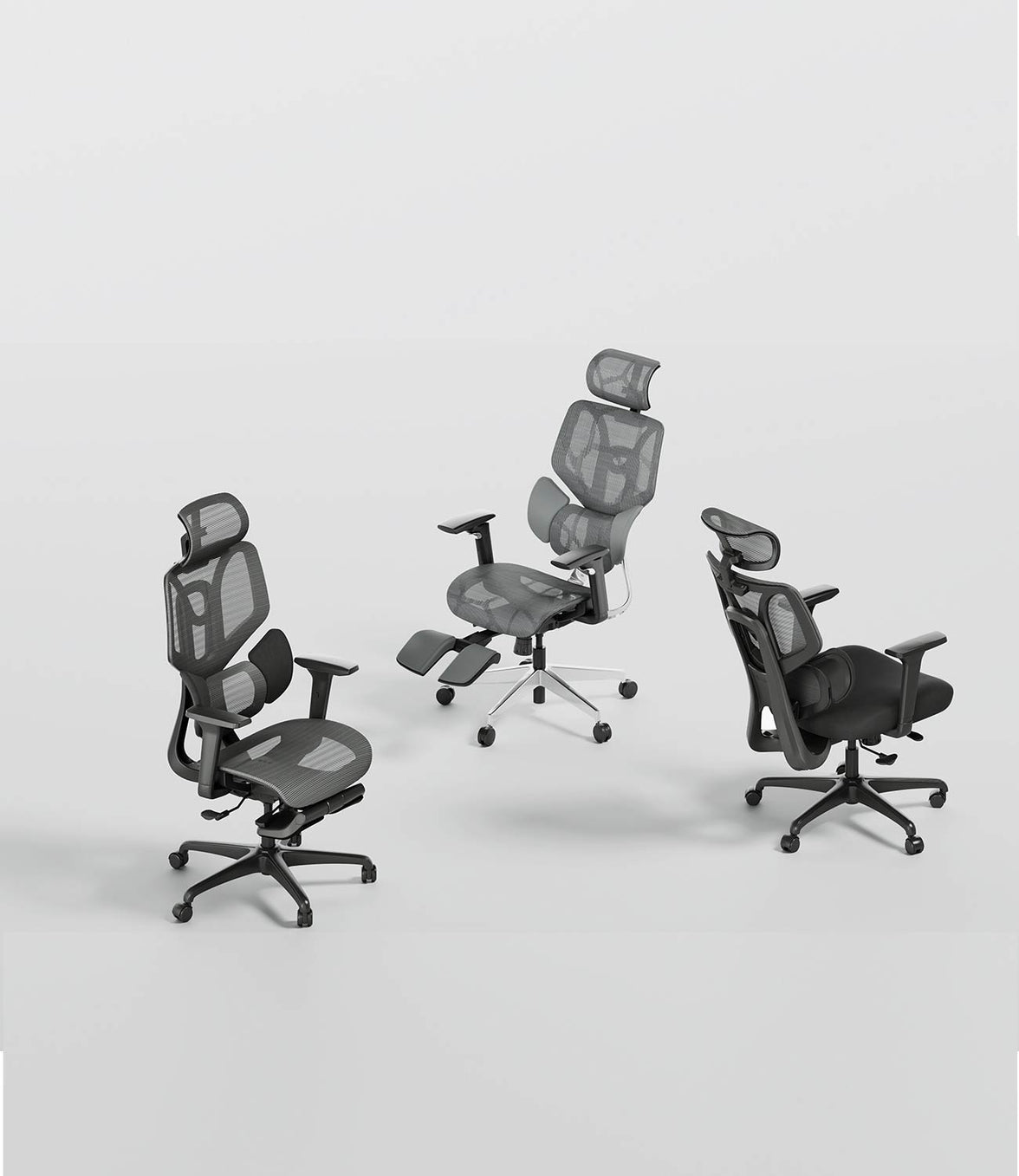
Der Begriff umfasst eine breite Palette an Stühlen. Ein Basismodell bietet vielleicht nur eine Höhenverstellung, während ein ergonomischer Bürostuhl auch eine verstellbare Lendenwirbelstütze, Armlehnen, Sitztiefe und Neigung bieten kann. Vergleichen Sie die tatsächlichen Einstellfunktionen, anstatt nur nach dem Aussehen zu entscheiden.
Worauf Sie bei einem Bürostuhl achten sollten

Lendenwirbelstütze
Die Lendenwirbelstütze sollte sich angenehm am unteren Rücken anfühlen. Höhen-, Tiefen- oder adaptive Verstellmöglichkeiten helfen verschiedenen Nutzern, eine geeignete Position zu finden. Mehr Druck ist nicht zwangsläufig besser: Die Stütze sollte Sie nicht von der Rückenlehne wegdrücken oder unangenehme Druckpunkte erzeugen.
Sitzhöhe und Sitztiefe
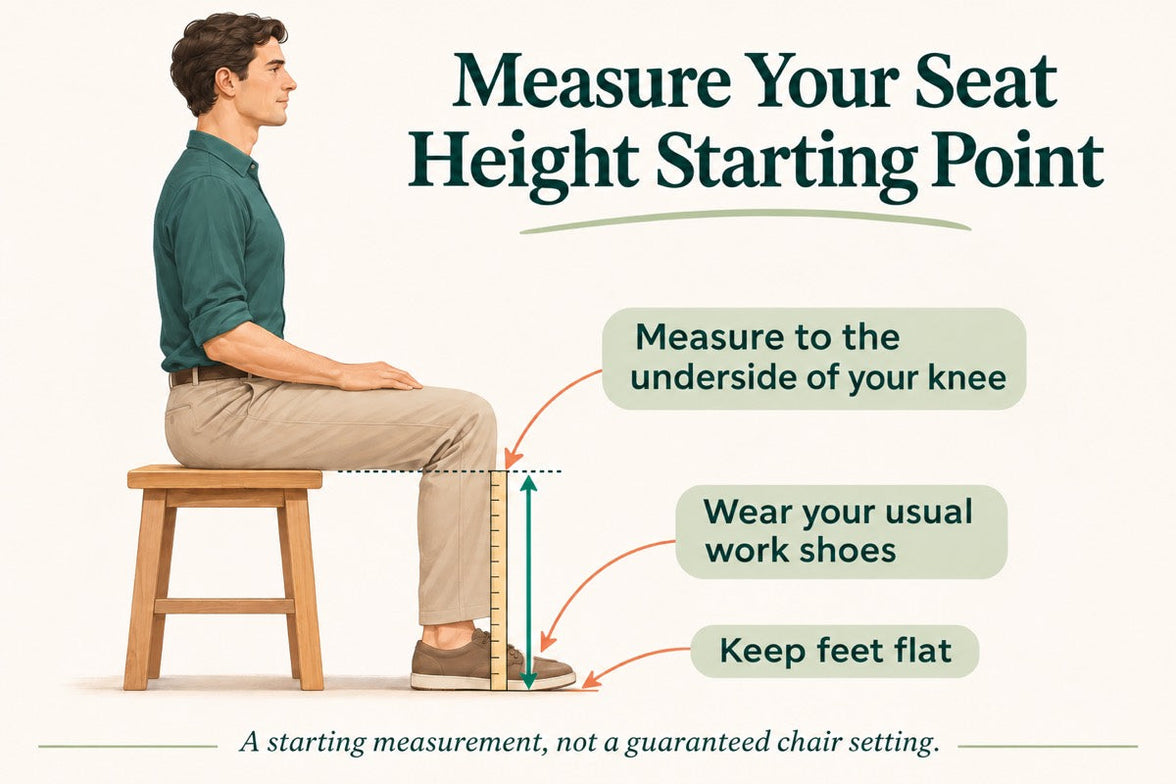
Überprüfen Sie den Bereich der Sitzhöhenverstellung und die nutzbare Sitztiefe in Zentimetern. Ihre Füße sollten Unterstützung finden, und die Vorderkante sollte ausreichend Platz hinter Ihren Knien lassen. Die empfohlene Körpergröße ist nur ein Anhaltspunkt, da Menschen gleicher Größe unterschiedliche Körperproportionen haben können.
Atmungsaktive Materialien
Netzstoff ermöglicht eine gute Luftzirkulation, aber auch das Sitzgefühl ist entscheidend. Berücksichtigen Sie neben der Atmungsaktivität auch die Festigkeit, die Form der Kante und den Halt. Falls möglich, testen Sie den Stuhl während der täglichen Arbeit, anstatt den Komfort nur nach einem kurzen Probesitzen zu beurteilen.
Neigung und Bewegung
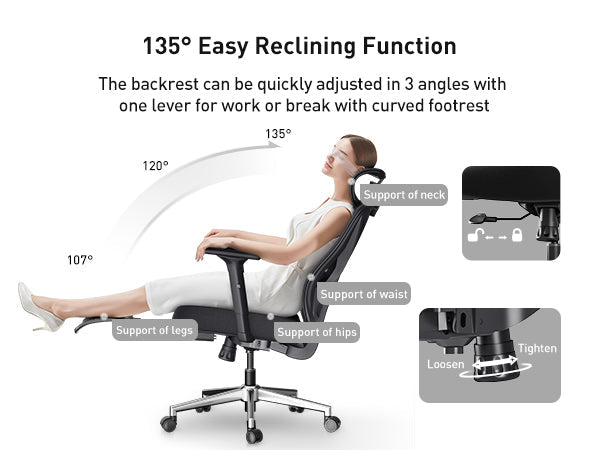
Vergleichen Sie die Neigungsmechanik, die verfügbaren Arretierungspositionen und etwaige Gewichtseinstellungen. Ein größerer maximaler Winkel ist nicht automatisch nützlicher beim Tippen oder bei Meetings. Wählen Sie Funktionen, die sowohl konzentriertes Arbeiten als auch Positionswechsel unterstützen.
Armlehnenverstellung
Prüfen Sie, ob die Armlehnen in einer bequemen Höhe eingestellt werden können und nicht mit dem Schreibtisch kollidieren. Je nach Tastatur, Maus und Ihren täglichen Aufgaben können auch Einstellmöglichkeiten für Breite, Tiefe und Rotation hilfreich sein.
Bauweise, Belastbarkeit und Kundenservice
Vergleichen Sie die angegebene maximale Belastbarkeit in Kilogramm, die Montageanleitungen und den Support für Ersatzteile. Lesen Sie die EU-Garantie- und Rückgabebedingungen für das jeweilige Modell, bevor Sie bestellen.
Vergleich der HBADA Bürostühle
| Modell | Warum in Betracht ziehen? | Was zu prüfen ist |
|---|---|---|
| HBADA X7 | Automatische Lendenwirbelverfolgung und motorisierte Komfortfunktionen. | Sitzmaße, Bedienelemente und Stromversorgung. |
| HBADA E3 Pro | Anpassbare Stütze für den primären Schreibtischstuhl. | Edition, Lendenwirbelverstellung und gewählte Fußstützenoption. |
| HBADA E3 Air | Atmungsaktives Netzmaterial und ergonomische Einstellungen für den Alltag. | Edition, Armlehnensteuerung und Fußstützenkonfiguration. |
| HBADA E3 Ultra | Eine Alternative für Nutzer, die zusätzliche Komfort- und Einstelloptionen vergleichen. | Funktionen des aktuellen EU-Modells, Neigung und Details zur Fußstütze. |
| HBADA P2 | Eine Option zur Prüfung, ob die erforderliche EU-Variante verfügbar ist. | Aktuelles Angebot, Spezifikationen, Preis und lokaler Support. |
HBADA X7: Für Nutzer, die motorisierte Verstellung bevorzugen
Der HBADA X7 Smart Ergonomic Chair ist das technikorientierte Modell in diesem Vergleich. Die EU-Produktseite beschreibt eine automatische Lendenwirbelverfolgung, Sitzbelüftung und Massagefunktionen.
Ziehen Sie ihn in Betracht, wenn Sie eine automatische Lendenwirbelstütze der wiederholten manuellen Einstellung vorziehen. Überprüfen Sie die Bedienelemente und Sitzmaße sorgfältig: Motorisierte Funktionen ersetzen nicht die Notwendigkeit eines Stuhls, der zu Ihrem Körper und Ihrem Schreibtisch passt.
- Sie automatische Lendenwirbelverfolgung bevorzugen.
- Sitzbelüftung an Ihrem Arbeitsplatz wichtig ist.
- Sie motorisierte Komfortfunktionen wünschen.
- Die Maße und Betriebsanforderungen zu Ihrem Setup passen.
HBADA E3 Pro: Für ein anpassbareres Sitz-Setup

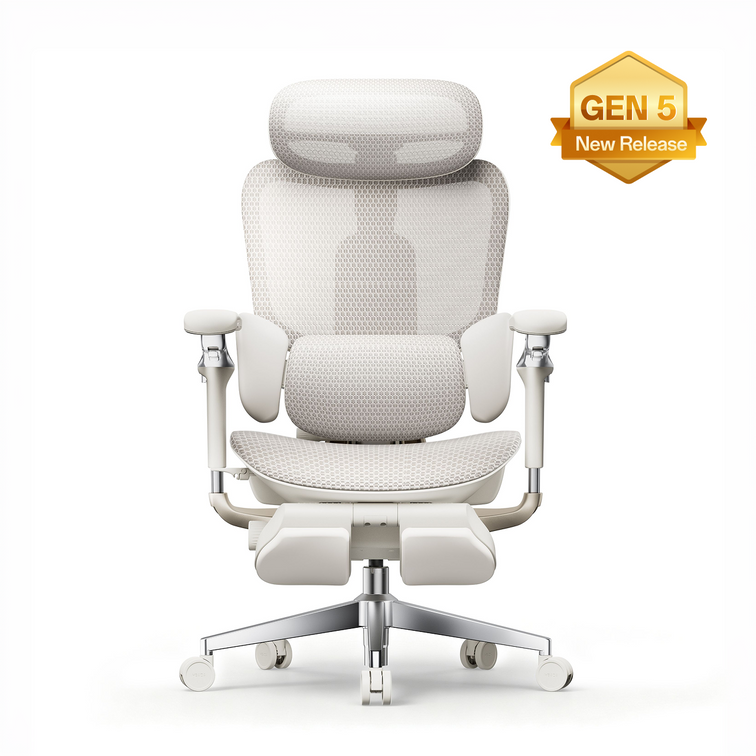
Der HBADA E3 Pro Ergonomic Office Chair ist einen Vergleich wert, wenn Lendenwirbelstütze und verstellbare Sitzmöglichkeiten Priorität haben. Prüfen Sie, wie die Stütze Ihren Rücken berührt und welche Einstellungen bei der gewählten Edition verfügbar sind.
Der Name "Pro" taucht bei verschiedenen Konfigurationen auf. Vergleichen Sie das exakte Produkt, anstatt Spezifikationen von einem anderen Markt oder einer anderen Generation zu übertragen.
- Die Lendenwirbelpassform bei der Wahl des Stuhls Priorität hat.
- Sie die Sitzposition an Ihren Schreibtisch anpassen möchten.
- Sie zwischen konzentrierter Arbeit und zurückgelehnten Pausen abwechseln.
- Sie die verfügbaren E3 Pro-Editionen verglichen haben.
HBADA E3 Air: Für die tägliche Büroarbeit
Der HBADA E3 Air Ergonomic Office Chair kombiniert atmungsaktives Netzmaterial mit einer Einstellbarkeit von Lendenwirbelstütze, Kopfstütze und Armlehnen. Das verlinkte EU-Angebot beschreibt eine Neigung von bis zu 140°.
Es ist ein Modell zum Vergleichen, wenn Sie ergonomische Funktionen für den Alltag suchen, ohne dass motorisierte Komfortfunktionen im Mittelpunkt des Kaufs stehen. Prüfen Sie die gewählte Version sorgfältig, insbesondere ob sie eine Fußstütze enthält.
- Sie atmungsaktives Netzmaterial bevorzugen.
- Sie Einstellmöglichkeiten für normale Schreibtischarbeit wünschen.
- Sie das Preis-Leistungs-Verhältnis innerhalb der E3-Serie vergleichen.
- Sie den aktuellen Preis und die gewählte Edition geprüft haben.
HBADA E3 Ultra: Prüfen Sie die aktuelle EU-Konfiguration
Nehmen Sie den HBADA E3 Ultra in Ihre engere Wahl, wenn Sie Komfortfunktionen für Schreibtischarbeit, Lesen und kurze Sitzpausen vergleichen.
Nutzen Sie das aktuelle EU-Angebot, um das Einstellsystem, den Neigungsbereich und die Frage zu klären, ob die gewählte Konfiguration eine Fußstütze beinhaltet. Spezifikationen eines ähnlich benannten .com-Produkts sollten nicht als austauschbar betrachtet werden.
- Sie zusätzliche Komfortfunktionen vergleichen möchten.
- Sie Ihren Stuhl sowohl für die Arbeit als auch zum Lesen nutzen.
- Die gewählte Konfiguration die von Ihnen benötigten Funktionen enthält.
- Die gewünschte Variante für Ihren Bestimmungsort verfügbar ist.
HBADA P2: Zuerst EU-Verfügbarkeit bestätigen
Wenn Sie den P2 für einen gelegentlichen oder sekundären Arbeitsplatz in Betracht ziehen, stellen Sie zunächst sicher, dass eine entsprechende EU-Variante verfügbar ist. Lendenwirbelstütze, Armlehnen, Neigung und Fußstützenspezifikationen sollten anhand dieses exakten Angebots überprüft werden.
Falls der P2 nicht im aktuellen EU-Sortiment aufgeführt ist, kontaktieren Sie service@hbada.eu, bevor Sie sich auf Preise oder Spezifikationen aus einem anderen Markt verlassen.
- Das Modell ist für Ihr Lieferland verfügbar.
- Die Sitzmaße und der Einstellbereich passen zu Ihren Anforderungen.
- Die gewählte Variante enthält die von Ihnen benötigten Funktionen.
- EU-Kundensupport und geltende Bedingungen sind klar.
Wahl eines Bürostuhls nach Arbeitsstil
Es gibt nicht den einen perfekten Bürostuhl für jedes Büro. Identifizieren Sie die Einstellungen, die Sie tatsächlich nutzen werden, bevor Sie zusätzliche Funktionen vergleichen.
- Lange Sitzungen am Schreibtisch: Priorisieren Sie Passform, nützliche Einstellmöglichkeiten und Leichtigkeit beim Wechsel der Sitzposition. Vergleichen Sie die automatische X7-Stütze mit den Bedienelementen der E3-Modelle.
- Alltäglicher Home-Office-Einsatz: Vergleichen Sie E3 Air und E3 Pro mit Ihrer Schreibtischhöhe, Körpermaßen und Ihrem Budget.
- Lesen und kurze zurückgelehnte Pausen: Prüfen Sie die Neigungssteuerung und die exakte Fußstützenkonfiguration, einschließlich der E3 Ultra-Optionen.
- Ein sekundärer Arbeitsplatz: Konzentrieren Sie sich auf grundlegende Passform und Einstellung. Ziehen Sie den P2 nur in Betracht, wenn EU-Verfügbarkeit und Spezifikationen bestätigt sind.
Für einen gemeinsam genutzten Arbeitsplatz wählen Sie Bedienelemente, die jeder Nutzer versteht und erreichen kann. Prüfen Sie die Mindest- und Maximalmaße, anstatt davon auszugehen, dass eine gespeicherte Position für jeden passt.
Tipps zur Einrichtung des Bürostuhls
- Stellen Sie die Sitzhöhe ein. Ihre Füße sollten vom Boden oder einer geeigneten Fußstütze gestützt werden.
- Prüfen Sie die Sitztiefe. Setzen Sie sich ganz zurück und lassen Sie einen kleinen Abstand zwischen der Sitzkante und Ihren Kniekehlen.
- Positionieren Sie die Lendenwirbelstütze. Justieren Sie diese schrittweise und vermeiden Sie übermäßigen Druck.
- Stellen Sie die Armlehnen ein. Stützen Sie Ihre Unterarme, ohne dass sich Ihre Schultern anheben oder der Zugang zum Schreibtisch blockiert wird.
- Prüfen Sie die Reichweite zu Tastatur und Maus. Halten Sie beides während Ihrer üblichen Aufgaben in komfortabler Reichweite.
- Justieren Sie den Bildschirm. Positionieren Sie ihn so, dass Sie lesen können, ohne sich wiederholt vorzubeugen oder den Hals zu beugen.
- Wechseln Sie regelmäßig die Position. Kombinieren Sie sitzende Arbeit mit Bewegung und wechselnden Aktivitäten.
Häufig gestellte Fragen
Welchen HBADA Bürostuhl sollte ich für lange Arbeitssitzungen in Betracht ziehen?
Vergleichen Sie den X7, wenn Sie automatische Lendenwirbelverfolgung bevorzugen, oder E3-Modelle, wenn deren Einstellmöglichkeiten besser zu Ihren Bedürfnissen passen. Sitzpassform, Schreibtischkompatibilität und die bevorzugte Bedienung sind wichtiger als die Anzahl der Funktionen.
Welchen Stuhl sollte ich wählen, wenn die Lendenwirbelstütze meine Priorität ist?
Vergleichen Sie zunächst die Unterstützung und Einstellungsmöglichkeiten des E3 Pro mit der automatischen Verfolgung des X7. Wählen Sie die Option, die einen angenehmen Kontakt mit Ihrem unteren Rücken herstellt, ohne Sie in eine unbequeme Position zu drücken.
Ist der E3 Air eine preisorientierte Option?
Der E3 Air ist eine Option für Käufer, die atmungsaktives Sitzen und alltägliche Einstellmöglichkeiten priorisieren. Vergleichen Sie aktuelle EU-Preise und Editionen, bevor Sie entscheiden, welches Modell die von Ihnen benötigten Funktionen innerhalb Ihres Budgets bietet.
Verfügt jeder HBADA Bürostuhl über eine Fußstütze?
Nein. Die Verfügbarkeit einer Fußstütze hängt vom Modell und der gewählten Konfiguration ab. Prüfen Sie die auf der Produktseite und in Ihrem Warenkorb angezeigte Option vor der Bestellung.
Benötige ich die größtmögliche Neigung?
Nicht unbedingt. Vergleichen Sie die Arretierungspositionen, die Beweglichkeit und die Unterstützung, die Sie während der Arbeit nutzen können. Eine stärkere Neigung kann für kurze Pausen geeignet sein, aber der maximale Winkel allein bestimmt nicht, ob ein Stuhl gut passt.
Kann ein Bürostuhl Rückenschmerzen behandeln?
Ein Bürostuhl ist keine medizinische Behandlung. Ein geeignetes Setup kann sich bequemer anfühlen, aber anhaltende, starke oder sich verschlimmernde Schmerzen sollten von einem qualifizierten Arzt untersucht werden.
Sind EU- und US-Versionen immer identisch?
Gehen Sie nicht davon aus. Modellnamen, Editionen, Konfigurationen und Verfügbarkeit können abweichen. Nutzen Sie für Ihren Kauf die EU-Produktseite und die geltenden EU-Bedingungen.
Abschließende Gedanken
Die Wahl eines Bürostuhls beginnt bei der Passform. Vergleichen Sie Sitzmaße, Lendenwirbelstütze und Bedienelemente mit Ihrem Körper, Ihrem Schreibtisch und Ihrem täglichen Arbeitsablauf.
Wählen Sie den X7 für automatische Unterstützung, den E3 Pro für verstellbare Sitzmöglichkeiten und den E3 Air für täglichen Netz-Komfort. Prüfen Sie die aktuelle E3 Ultra-Konfiguration, wenn zusätzliche Komfortfunktionen für Sie wichtig sind, und bestätigen Sie die lokale Verfügbarkeit, bevor Sie den P2 in Betracht ziehen.
Vergleichen Sie das aktuelle EU-Sortiment, wählen Sie die exakte Edition und Konfiguration aus und überprüfen Sie Liefer-, Rückgabe- und Garantieinformationen für Ihren Bestimmungsort, bevor Sie bestellen.
Entdecken Sie HBADA EU Bürostühle