




Tutti gli articoli HBADA
 Why Ergonomics is Your SMB’s Most Strategic Asset
Discover why ergonomic seating is a strategic growth asset for SMBs. Upgrade your existing workspace instantly with HBADA’s plug-and-play bulk solutions. No expensive design teams required. Get your corporate quote today.
Jun 04, 2026
Why Ergonomics is Your SMB’s Most Strategic Asset
Discover why ergonomic seating is a strategic growth asset for SMBs. Upgrade your existing workspace instantly with HBADA’s plug-and-play bulk solutions. No expensive design teams required. Get your corporate quote today.
Jun 04, 2026
 Pulire le rotelle della sedia da ufficio | Guida e consigli | HBADA
Articolo completo in italiano
Scivolata fluida e silenziosa: come pulire e proteggere le rotelle della tua sedia da ufficio
Una scivolata dolce e silenziosa sul pavimento del tuo ufficio la noti davvero solo quando improvvisamente si blocca. Per gli amanti degli animali e i lavoratori da remoto, i capelli persi e i peli degli animali che galleggiano sul pavimento creano problemi specifici per le rotelle della sedia da ufficio, rallentando gradualmente i tuoi spostamenti.
Quando capelli e detriti si avvolgono attorno alle rotelle, si attaccano all'asse e rendono difficile lo spostamento della sedia. Sapere come rimuovere i capelli dalle rotelle della tua sedia da ufficio ti aiuta a proteggere i pavimenti, a mantenere silenzioso lo spazio di lavoro e a ritrovare una mobilità fluida.
Anatomia di un blocco: perché i capelli distruggono il meccanismo delle rotelle
Per capire perché i capelli causano problemi, è utile sapere come funzionano la maggior parte delle rotelle delle sedie da ufficio. Molte sedie utilizzano doppie rotelle che girano attorno a un perno centrale.
Il processo di avvolgimento accelerato
Quando la rotella della tua sedia passa sopra un capello o un pelo di animale, lo avvolge attorno all'asse come una bobina. Col tempo, sempre più capelli si accumulano e formano un nodo stretto all'interno della rotella. Questo nodo preme contro la ruota e impedisce ai cuscinetti a sfera di girare correttamente.
Danni a lungo termine all'hardware
Ignorare le rotelle ostruite non significa solo avere una mobilità ridotta. Una rotella che striscia può graffiare i pavimenti o lasciare segni sui tappeti. A lungo termine, lo sforzo aggiuntivo può persino danneggiare la base della sedia.
Guida passo dopo passo: come pulire in sicurezza le rotelle della sedia da ufficio
Pulire peli e fibre accumulati non richiede attrezzature specializzate né la sostituzione completa delle rotelle. Segui questa procedura sistematica per pulire le rotelle della tua sedia da ufficio e ritrovare la mobilità originale in meno di 10 minuti.
Passo 1: Isolare la baseCapovolgi la sedia su un asciugamano spesso o un tappeto morbido per esporre la base a cinque razze.
Passo 2: Rimuovere le rotelleAfferra saldamente il corpo della rotella e tira verso l'alto per estrarla dall'alloggiamento. Se è troppo stretta, inserisci la lama di un cacciavite a testa piatta tra lo stelo della rotella e la base per fare leva.
Passo 3: Rimuovere i detriti superficialiUsa una spazzola a setole dure o un panno asciutto per eliminare accumuli di polvere, forfora di animali e sporcizia intrappolata nell'arco della rotella.
Passo 4: Tagliare i nodi di fibre interniInserisci la lama di un taglierino di precisione o di forbici da cucito sottili nello spazio tra le due rotelle gemelle, tagliando gli anelli di fibre compattate per rompere il nodo.
Passo 5: Estrazione delle fibre intrappolateRimuovi i frammenti di fibra tagliati usando una pinza a becco lungo, girando manualmente le rotelle per liberare eventuali ciocche rimaste avvolte attorno al perno.
Misure proattive: come proteggere le rotelle della sedia dai capelli
È utile sapere come pulire le rotelle, ma ancora meglio è prevenire l'accumulo di capelli.
Gestire l'ambiente del pavimento
Il modo più semplice per evitare che i capelli entrino nelle rotelle è mantenere pulita l'area del pavimento intorno a te. Una spazzata rapida quotidiana o un passaggio dell'aspirapolvere robotizzato sotto la scrivania impedisce ai peli fluttuanti di accumularsi sotto la postazione di lavoro. Se lavori con un compagno peloso che perde il pelo, spazzolarlo regolarmente aiuta a catturare i peli prima che si avvolgano attorno alle rotelle.
Strategie con tappetini
Un tappetino rigido e liscio è ideale per evitare l'accumulo di capelli. A differenza di tappeti spessi o moquette, un tappetino solido si pulisce facilmente e consente alle rotelle di scorrere senza raccogliere detriti.
Passare a rotelle resistenti ai capelli
Se desideri una soluzione duratura ai problemi di capelli e detriti, considera di sostituire le rotelle standard con rotelle a telaio aperto (tipo rotelle da rollerblade).
Queste rotelle resistenti ai capelli utilizzano robusti cuscinetti a sfera in acciaio e un design aperto, consentendo a capelli e detriti di passare senza rimanere incastrati. Ottieni così uno scorrimento fluido e senza manutenzione.
Ingegneria avanzata: igiene attiva per gamma di prodotti
Le sedie da ufficio moderne sono progettate per durare, ogni componente è pensato per durabilità e facile pulizia, dallo schienale in mesh alle rotelle.
Efficienza di manutenzione premium: Hbada E3 Pro
La HBADA E3 Pro è costruita con componenti robusti e di alta qualità per ambienti di lavoro affollati. Dispone di una base resistente e rotelle silenziose dallo scorrimento fluido. I cappucci delle rotelle sono progettati per impedire a polvere, peli di animali e fibre di entrare, garantendo tranquillità e mobilità duratura.
Il massimo dell'innovazione: Hbada AI-Powered x7
Se cerchi una sedia high-tech e confortevole, la Hbada AI-Powered x7 è una scelta eccellente. Il suo telaio in alluminio di qualità aeronautica e le rotelle lisce distribuiscono uniformemente il tuo peso.
La seduta in mesh aperta non accumula elettricità statica né peli di animali. Le sue rotelle sono facili da pulire senza attrezzi, mantenendo l'ufficio in ordine con poco sforzo.
Prestazioni di mobilità per gamma
Hbada E3 Air : progettata per spazi di lavoro ibridi, con rotelle in polimero leggero che rotolano silenziosamente su pavimenti duri e moquette a pelo corto.
Hbada E3 Pro : pensata per spazi di lavoro esigenti e lunghe giornate, con rotelle in PU a doppio cuscinetto rinforzato che resistono all'accumulo di fibre e proteggono i pavimenti in legno.
Hbada AI-Powered x7 : realizzata per centri d'innovazione premium e uffici direzionali, combina un telaio con rilevamento attivo della postura e rotelle a sgancio rapido per una manutenzione senza sforzo.
Conclusione
Il modo migliore per evitare il fastidio di capelli e peli di animali che si impigliano nella tua sedia da ufficio è sapere come mantenerla correttamente. Non aspettare che le rotelle diventino rigide e rovinino il pavimento; dedica 10 minuti a tagliare le fibre avvolte per mantenere il tuo spazio di lavoro fluido e silenzioso. Un controllo regolare dell'hardware e un pavimento pulito proteggeranno il tuo investimento per l'home office e garantiranno che la tua attrezzatura funzioni come dovrebbe.
Grazie ai nostri modelli avanzati, sviluppati da zero, abbiamo ridotto le difficoltà di manutenzione quotidiana. La HBADA E3 Pro è dotata di mozzi delle rotelle sigillati che impediscono naturalmente l'accumulo di peli di animali sugli assi, mentre la HBADA AI-Powered x7, aperta e altamente efficiente, evita l'accumulo di polvere statica e forfora animale. Investire in un'ergonomia di alta qualità ti fa risparmiare tempo nella risoluzione dei problemi e ti permette di concentrarti sulla tua produttività.
Domande frequenti (FAQ)
Qual è il modo più semplice per rimuovere i capelli profondamente avvolti sugli assi delle rotelle?
Se un nodo è troppo stretto per essere estratto con una pinza, il metodo migliore è usare un taglierino di precisione o forbici da cucito sottili. Inserisci la lama nello spazio della rotella, taglia gli anelli di fibre compattate, quindi rimuovi i pezzi con una pinza.
Le rotelle singole stile rollerblade sono compatibili con la base standard della mia sedia?
Sì. La maggior parte delle sedie da ufficio di qualità utilizza steli standardizzati da 11 mm di diametro e 22 mm di lunghezza. Questa compatibilità universale ti consente di sostituire le rotelle gemelle originali con rotelle resistenti ai capelli in meno di 5 minuti, senza attrezzi speciali.
Con quale frequenza i proprietari di animali dovrebbero pulire le rotelle della loro sedia da ufficio?
Se condividi il tuo home office con animali a pelo lungo, è ideale controllare le rotelle ogni tre mesi. Un controllo regolare impedisce alle piccole fibre di formare nodi stretti, protegge il pavimento e mantiene il silenzio delle rotelle.
Posso usare WD-40 per mantenere fluide le rotelle della mia sedia da ufficio?
È meglio evitare il WD-40 standard, perché agisce più come sgrassatore che come lubrificante duraturo. Asciuga rapidamente e attira la polvere. Invece, elimina le fibre intrappolate, quindi applica qualche goccia di lubrificante al silicone o un lubrificante secco PTFE per far girare perfettamente i tuoi cuscinetti.
May 29, 2026
Pulire le rotelle della sedia da ufficio | Guida e consigli | HBADA
Articolo completo in italiano
Scivolata fluida e silenziosa: come pulire e proteggere le rotelle della tua sedia da ufficio
Una scivolata dolce e silenziosa sul pavimento del tuo ufficio la noti davvero solo quando improvvisamente si blocca. Per gli amanti degli animali e i lavoratori da remoto, i capelli persi e i peli degli animali che galleggiano sul pavimento creano problemi specifici per le rotelle della sedia da ufficio, rallentando gradualmente i tuoi spostamenti.
Quando capelli e detriti si avvolgono attorno alle rotelle, si attaccano all'asse e rendono difficile lo spostamento della sedia. Sapere come rimuovere i capelli dalle rotelle della tua sedia da ufficio ti aiuta a proteggere i pavimenti, a mantenere silenzioso lo spazio di lavoro e a ritrovare una mobilità fluida.
Anatomia di un blocco: perché i capelli distruggono il meccanismo delle rotelle
Per capire perché i capelli causano problemi, è utile sapere come funzionano la maggior parte delle rotelle delle sedie da ufficio. Molte sedie utilizzano doppie rotelle che girano attorno a un perno centrale.
Il processo di avvolgimento accelerato
Quando la rotella della tua sedia passa sopra un capello o un pelo di animale, lo avvolge attorno all'asse come una bobina. Col tempo, sempre più capelli si accumulano e formano un nodo stretto all'interno della rotella. Questo nodo preme contro la ruota e impedisce ai cuscinetti a sfera di girare correttamente.
Danni a lungo termine all'hardware
Ignorare le rotelle ostruite non significa solo avere una mobilità ridotta. Una rotella che striscia può graffiare i pavimenti o lasciare segni sui tappeti. A lungo termine, lo sforzo aggiuntivo può persino danneggiare la base della sedia.
Guida passo dopo passo: come pulire in sicurezza le rotelle della sedia da ufficio
Pulire peli e fibre accumulati non richiede attrezzature specializzate né la sostituzione completa delle rotelle. Segui questa procedura sistematica per pulire le rotelle della tua sedia da ufficio e ritrovare la mobilità originale in meno di 10 minuti.
Passo 1: Isolare la baseCapovolgi la sedia su un asciugamano spesso o un tappeto morbido per esporre la base a cinque razze.
Passo 2: Rimuovere le rotelleAfferra saldamente il corpo della rotella e tira verso l'alto per estrarla dall'alloggiamento. Se è troppo stretta, inserisci la lama di un cacciavite a testa piatta tra lo stelo della rotella e la base per fare leva.
Passo 3: Rimuovere i detriti superficialiUsa una spazzola a setole dure o un panno asciutto per eliminare accumuli di polvere, forfora di animali e sporcizia intrappolata nell'arco della rotella.
Passo 4: Tagliare i nodi di fibre interniInserisci la lama di un taglierino di precisione o di forbici da cucito sottili nello spazio tra le due rotelle gemelle, tagliando gli anelli di fibre compattate per rompere il nodo.
Passo 5: Estrazione delle fibre intrappolateRimuovi i frammenti di fibra tagliati usando una pinza a becco lungo, girando manualmente le rotelle per liberare eventuali ciocche rimaste avvolte attorno al perno.
Misure proattive: come proteggere le rotelle della sedia dai capelli
È utile sapere come pulire le rotelle, ma ancora meglio è prevenire l'accumulo di capelli.
Gestire l'ambiente del pavimento
Il modo più semplice per evitare che i capelli entrino nelle rotelle è mantenere pulita l'area del pavimento intorno a te. Una spazzata rapida quotidiana o un passaggio dell'aspirapolvere robotizzato sotto la scrivania impedisce ai peli fluttuanti di accumularsi sotto la postazione di lavoro. Se lavori con un compagno peloso che perde il pelo, spazzolarlo regolarmente aiuta a catturare i peli prima che si avvolgano attorno alle rotelle.
Strategie con tappetini
Un tappetino rigido e liscio è ideale per evitare l'accumulo di capelli. A differenza di tappeti spessi o moquette, un tappetino solido si pulisce facilmente e consente alle rotelle di scorrere senza raccogliere detriti.
Passare a rotelle resistenti ai capelli
Se desideri una soluzione duratura ai problemi di capelli e detriti, considera di sostituire le rotelle standard con rotelle a telaio aperto (tipo rotelle da rollerblade).
Queste rotelle resistenti ai capelli utilizzano robusti cuscinetti a sfera in acciaio e un design aperto, consentendo a capelli e detriti di passare senza rimanere incastrati. Ottieni così uno scorrimento fluido e senza manutenzione.
Ingegneria avanzata: igiene attiva per gamma di prodotti
Le sedie da ufficio moderne sono progettate per durare, ogni componente è pensato per durabilità e facile pulizia, dallo schienale in mesh alle rotelle.
Efficienza di manutenzione premium: Hbada E3 Pro
La HBADA E3 Pro è costruita con componenti robusti e di alta qualità per ambienti di lavoro affollati. Dispone di una base resistente e rotelle silenziose dallo scorrimento fluido. I cappucci delle rotelle sono progettati per impedire a polvere, peli di animali e fibre di entrare, garantendo tranquillità e mobilità duratura.
Il massimo dell'innovazione: Hbada AI-Powered x7
Se cerchi una sedia high-tech e confortevole, la Hbada AI-Powered x7 è una scelta eccellente. Il suo telaio in alluminio di qualità aeronautica e le rotelle lisce distribuiscono uniformemente il tuo peso.
La seduta in mesh aperta non accumula elettricità statica né peli di animali. Le sue rotelle sono facili da pulire senza attrezzi, mantenendo l'ufficio in ordine con poco sforzo.
Prestazioni di mobilità per gamma
Hbada E3 Air : progettata per spazi di lavoro ibridi, con rotelle in polimero leggero che rotolano silenziosamente su pavimenti duri e moquette a pelo corto.
Hbada E3 Pro : pensata per spazi di lavoro esigenti e lunghe giornate, con rotelle in PU a doppio cuscinetto rinforzato che resistono all'accumulo di fibre e proteggono i pavimenti in legno.
Hbada AI-Powered x7 : realizzata per centri d'innovazione premium e uffici direzionali, combina un telaio con rilevamento attivo della postura e rotelle a sgancio rapido per una manutenzione senza sforzo.
Conclusione
Il modo migliore per evitare il fastidio di capelli e peli di animali che si impigliano nella tua sedia da ufficio è sapere come mantenerla correttamente. Non aspettare che le rotelle diventino rigide e rovinino il pavimento; dedica 10 minuti a tagliare le fibre avvolte per mantenere il tuo spazio di lavoro fluido e silenzioso. Un controllo regolare dell'hardware e un pavimento pulito proteggeranno il tuo investimento per l'home office e garantiranno che la tua attrezzatura funzioni come dovrebbe.
Grazie ai nostri modelli avanzati, sviluppati da zero, abbiamo ridotto le difficoltà di manutenzione quotidiana. La HBADA E3 Pro è dotata di mozzi delle rotelle sigillati che impediscono naturalmente l'accumulo di peli di animali sugli assi, mentre la HBADA AI-Powered x7, aperta e altamente efficiente, evita l'accumulo di polvere statica e forfora animale. Investire in un'ergonomia di alta qualità ti fa risparmiare tempo nella risoluzione dei problemi e ti permette di concentrarti sulla tua produttività.
Domande frequenti (FAQ)
Qual è il modo più semplice per rimuovere i capelli profondamente avvolti sugli assi delle rotelle?
Se un nodo è troppo stretto per essere estratto con una pinza, il metodo migliore è usare un taglierino di precisione o forbici da cucito sottili. Inserisci la lama nello spazio della rotella, taglia gli anelli di fibre compattate, quindi rimuovi i pezzi con una pinza.
Le rotelle singole stile rollerblade sono compatibili con la base standard della mia sedia?
Sì. La maggior parte delle sedie da ufficio di qualità utilizza steli standardizzati da 11 mm di diametro e 22 mm di lunghezza. Questa compatibilità universale ti consente di sostituire le rotelle gemelle originali con rotelle resistenti ai capelli in meno di 5 minuti, senza attrezzi speciali.
Con quale frequenza i proprietari di animali dovrebbero pulire le rotelle della loro sedia da ufficio?
Se condividi il tuo home office con animali a pelo lungo, è ideale controllare le rotelle ogni tre mesi. Un controllo regolare impedisce alle piccole fibre di formare nodi stretti, protegge il pavimento e mantiene il silenzio delle rotelle.
Posso usare WD-40 per mantenere fluide le rotelle della mia sedia da ufficio?
È meglio evitare il WD-40 standard, perché agisce più come sgrassatore che come lubrificante duraturo. Asciuga rapidamente e attira la polvere. Invece, elimina le fibre intrappolate, quindi applica qualche goccia di lubrificante al silicone o un lubrificante secco PTFE per far girare perfettamente i tuoi cuscinetti.
May 29, 2026
 What Is the 20-8-2 Rule? Everything You Need to Know About Healthier Sitting and Productive Work
Sitting at your desk all day can quietly harm your health, making it harder to focus and putting stress on your lower back. Some people think standing all day is the answer, but too much standing can also lead to tired muscles and poor circulation.
The key to keeping your spine healthy is to keep changing your position throughout the day. Dr. Alan Hedge, an ergonomics professor at Cornell University, created the 20-8-2 rule to help you add movement to your work routine and boost your energy.
Deconstructing the Formula: The 30-Minute Ergonomic Cycle
The 20-8-2 rule divides each half hour of your workday into three easy steps. Following this routine helps keep your muscles loose and your blood flowing.
20 Minutes: Focused Sitting ➔ 8 Minutes: Active Standing ➔ 2 Minutes: Dynamic Movement
The 20 Minutes: Focused Sitting (With Proper Alignment)
Start with 20 minutes of focused work while sitting. Make sure your feet are flat on the floor, your elbows are at 90 degrees, and your lower back is well supported.
The 8 Minutes: Active Standing
After 20 minutes, stand up for the next 8 minutes. Standing changes the pressure on your spine, activates your core, and helps your body work better. This is a good time to take calls, review documents, or check your email.
The 2 minutes: Dynamic Movement
For the last 2 minutes, leave your desk. Use this time to walk around, get some water, or do light stretches. This short break helps relax your muscles and refresh your mind for the next round.
Architectural Pairing: Selecting the Right Desk Environment
To follow this movement routine easily, your workspace should let you change positions quickly. Manual crank desks can slow you down and make it harder to stick with the routine.
A premium adjustable desk system makes transitioning effortless. For example, pairing this cycle with a high-end Herman Miller standing desk provides programmable, single-touch height adjustments that move to your exact standing and sitting heights in seconds. This speed allows you to transition between positions seamlessly without interrupting your train of thought or slowing down your output.
Seating Engineering: Maximizing Your 20-Minute Sitting Window
The 20-minute sitting phase of this rule is only effective if your chair provides active support for your body. If you spend those 20 minutes slouching in a rigid, unyielding chair, your muscles will tighten before you even begin the standing phase.
Our advanced seating designs align with this movement philosophy by replacing manual levers with responsive, automated engineering:
Adaptive Structural Control: HBADA E3 Pro
The HBADA E3 Pro 2026 Edition is designed for users who move frequently while working. Its 3-zone lumbar support system features a central section for spinal support and side wings that adjust up to 40 degrees to accommodate lower back movement.
When you change positions or lean forward, the chair’s tracking system moves with you and fills the gap in your lower back, so you don’t have to adjust anything yourself.
Smart Automated Wellness: Hbada AI-Powered x7
For posture support, the Hbada AI-Powered x7 functions as a smart wellness assistant. It uses sensors to monitor your sitting position and adjusts in real time.
When you start your 20-minute work session, the chair automatically adjusts its support to fit your body. If you begin to slouch, it shifts its support to keep your posture straight and comfortable.
Feature Synergy Matrix: Enhancing the 20-8-2 Workflow
Workspace Component
Core Function in the Cycle
Mechanical Option (E3 Pro)
Advanced Active Option (X7)
Lumbar Support Strategy
Protects the spine during the 20-minute focus window
3-Zone Adaptive Wings with 5° Elastic Tracking
Motorized AI Smart Tracking with Real-Time Adjustments
Armrest Integration
Unloads weight from neck and shoulders while typing
720° Omni-Mechanical Positioning
720° Bio-Sync Robotic Tracking
Muscle Relief Systems
Relieves deep tissue tension during transitions
Breathable, High-Elasticity CloudMesh
8D Bionic Massage & Graphene Heat Therapy
Movement Compatibility
Adapts to changing postures without manual levers
Auto-Balance Gravity-Sensing Chassis
Posture Memory with Sensor-Driven Adjustment
Practical Checklist: Tips and Guides to Automate Your Routine
Starting a new routine can seem tough at first. Here are some simple tips to help you add the 20-8-2 method to your day:
· Deploy Digital Triggers: Use a browser extension or a smartwatch application to manage your intervals. Set a recurring 20-minute alert to prompt your transition to standing, followed by an 8-minute reminder to start your movement break.
· Batch Your Work Tasks: Align your daily tasks with your physical positions. Use your 20-minute sitting window for deep, focused work, such as coding or writing. Save your 8-minute standing window for low-intensity tasks, such as checking team updates or reviewing presentations.
· Utilize Thermal Therapy: If you feel muscle stiffness during your sitting window, activating the built-in heat settings on an advanced chair can help soothe lower back muscles, keeping your body limber for the upcoming movement phases.
Frequently Asked Questions (FAQ)
Can I stand for 20 minutes and sit for 8 minutes instead?
No. Dr. Hedge’s research shows that standing still for more than 10 minutes can cause blood to pool in your lower extremities, increasing static strain on your veins and feet. Keeping your standing window to 8 minutes provides the ideal vascular reset without creating structural discomfort.
How does an adaptive lumbar support chair help with the 20-8-2 rule?
A standard office chair stays locked in a single position, forcing your body to adapt to the frame. An adaptive chair automatically moves with you, keeping your lower back continuously supported throughout your sitting window so you can transition to standing without muscle stiffness.
What should I do during the 2-minute movement window?
Use this time for light, active movement to boost your circulation. You can walk down the hall, refill your water, or perform simple stretches like shoulder rolls and gentle calf extensions. Avoid looking at your phone during this phase to give your eyes a much-needed break.
Is a standing desk absolutely mandatory to use the 20-8-2 rule?
While a high-quality motorized desk makes changing positions effortless, you can start without one. You can use your 8-minute standing phase to take phone calls at a high counter or use a portable laptop riser on a standard table to keep your workflow moving smoothly.
Conclusion
The right workspace configuration depends on how much manual control you want over your daily routine. If you prefer a robust mechanical setup that uses your body weight to instantly adjust its support zones, the HBADA E3 Pro offers an incredibly effective foundation for active ergonomics. However, if you want a workspace that automatically tracks your posture, adjusts in real time with built-in sensors, and includes built-in massage therapy to relieve muscle tension between tasks, upgrading your office with the HBADA AI-Powered x7 is the ultimate investment for your health and daily focus.
May 25, 2026
What Is the 20-8-2 Rule? Everything You Need to Know About Healthier Sitting and Productive Work
Sitting at your desk all day can quietly harm your health, making it harder to focus and putting stress on your lower back. Some people think standing all day is the answer, but too much standing can also lead to tired muscles and poor circulation.
The key to keeping your spine healthy is to keep changing your position throughout the day. Dr. Alan Hedge, an ergonomics professor at Cornell University, created the 20-8-2 rule to help you add movement to your work routine and boost your energy.
Deconstructing the Formula: The 30-Minute Ergonomic Cycle
The 20-8-2 rule divides each half hour of your workday into three easy steps. Following this routine helps keep your muscles loose and your blood flowing.
20 Minutes: Focused Sitting ➔ 8 Minutes: Active Standing ➔ 2 Minutes: Dynamic Movement
The 20 Minutes: Focused Sitting (With Proper Alignment)
Start with 20 minutes of focused work while sitting. Make sure your feet are flat on the floor, your elbows are at 90 degrees, and your lower back is well supported.
The 8 Minutes: Active Standing
After 20 minutes, stand up for the next 8 minutes. Standing changes the pressure on your spine, activates your core, and helps your body work better. This is a good time to take calls, review documents, or check your email.
The 2 minutes: Dynamic Movement
For the last 2 minutes, leave your desk. Use this time to walk around, get some water, or do light stretches. This short break helps relax your muscles and refresh your mind for the next round.
Architectural Pairing: Selecting the Right Desk Environment
To follow this movement routine easily, your workspace should let you change positions quickly. Manual crank desks can slow you down and make it harder to stick with the routine.
A premium adjustable desk system makes transitioning effortless. For example, pairing this cycle with a high-end Herman Miller standing desk provides programmable, single-touch height adjustments that move to your exact standing and sitting heights in seconds. This speed allows you to transition between positions seamlessly without interrupting your train of thought or slowing down your output.
Seating Engineering: Maximizing Your 20-Minute Sitting Window
The 20-minute sitting phase of this rule is only effective if your chair provides active support for your body. If you spend those 20 minutes slouching in a rigid, unyielding chair, your muscles will tighten before you even begin the standing phase.
Our advanced seating designs align with this movement philosophy by replacing manual levers with responsive, automated engineering:
Adaptive Structural Control: HBADA E3 Pro
The HBADA E3 Pro 2026 Edition is designed for users who move frequently while working. Its 3-zone lumbar support system features a central section for spinal support and side wings that adjust up to 40 degrees to accommodate lower back movement.
When you change positions or lean forward, the chair’s tracking system moves with you and fills the gap in your lower back, so you don’t have to adjust anything yourself.
Smart Automated Wellness: Hbada AI-Powered x7
For posture support, the Hbada AI-Powered x7 functions as a smart wellness assistant. It uses sensors to monitor your sitting position and adjusts in real time.
When you start your 20-minute work session, the chair automatically adjusts its support to fit your body. If you begin to slouch, it shifts its support to keep your posture straight and comfortable.
Feature Synergy Matrix: Enhancing the 20-8-2 Workflow
Workspace Component
Core Function in the Cycle
Mechanical Option (E3 Pro)
Advanced Active Option (X7)
Lumbar Support Strategy
Protects the spine during the 20-minute focus window
3-Zone Adaptive Wings with 5° Elastic Tracking
Motorized AI Smart Tracking with Real-Time Adjustments
Armrest Integration
Unloads weight from neck and shoulders while typing
720° Omni-Mechanical Positioning
720° Bio-Sync Robotic Tracking
Muscle Relief Systems
Relieves deep tissue tension during transitions
Breathable, High-Elasticity CloudMesh
8D Bionic Massage & Graphene Heat Therapy
Movement Compatibility
Adapts to changing postures without manual levers
Auto-Balance Gravity-Sensing Chassis
Posture Memory with Sensor-Driven Adjustment
Practical Checklist: Tips and Guides to Automate Your Routine
Starting a new routine can seem tough at first. Here are some simple tips to help you add the 20-8-2 method to your day:
· Deploy Digital Triggers: Use a browser extension or a smartwatch application to manage your intervals. Set a recurring 20-minute alert to prompt your transition to standing, followed by an 8-minute reminder to start your movement break.
· Batch Your Work Tasks: Align your daily tasks with your physical positions. Use your 20-minute sitting window for deep, focused work, such as coding or writing. Save your 8-minute standing window for low-intensity tasks, such as checking team updates or reviewing presentations.
· Utilize Thermal Therapy: If you feel muscle stiffness during your sitting window, activating the built-in heat settings on an advanced chair can help soothe lower back muscles, keeping your body limber for the upcoming movement phases.
Frequently Asked Questions (FAQ)
Can I stand for 20 minutes and sit for 8 minutes instead?
No. Dr. Hedge’s research shows that standing still for more than 10 minutes can cause blood to pool in your lower extremities, increasing static strain on your veins and feet. Keeping your standing window to 8 minutes provides the ideal vascular reset without creating structural discomfort.
How does an adaptive lumbar support chair help with the 20-8-2 rule?
A standard office chair stays locked in a single position, forcing your body to adapt to the frame. An adaptive chair automatically moves with you, keeping your lower back continuously supported throughout your sitting window so you can transition to standing without muscle stiffness.
What should I do during the 2-minute movement window?
Use this time for light, active movement to boost your circulation. You can walk down the hall, refill your water, or perform simple stretches like shoulder rolls and gentle calf extensions. Avoid looking at your phone during this phase to give your eyes a much-needed break.
Is a standing desk absolutely mandatory to use the 20-8-2 rule?
While a high-quality motorized desk makes changing positions effortless, you can start without one. You can use your 8-minute standing phase to take phone calls at a high counter or use a portable laptop riser on a standard table to keep your workflow moving smoothly.
Conclusion
The right workspace configuration depends on how much manual control you want over your daily routine. If you prefer a robust mechanical setup that uses your body weight to instantly adjust its support zones, the HBADA E3 Pro offers an incredibly effective foundation for active ergonomics. However, if you want a workspace that automatically tracks your posture, adjusts in real time with built-in sensors, and includes built-in massage therapy to relieve muscle tension between tasks, upgrading your office with the HBADA AI-Powered x7 is the ultimate investment for your health and daily focus.
May 25, 2026
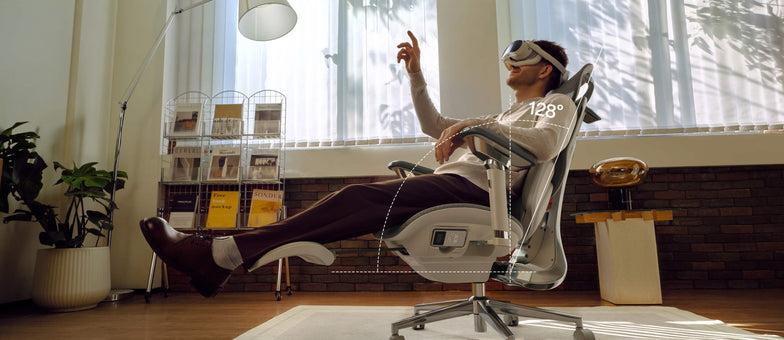 Le migliori sedie ergonomiche per appartamenti piccoli nel 2026
Introduzione
Avere poco spazio non significa rinunciare a una buona postura. Le sedie ergonomiche compatte offrono un supporto completo senza ingombrare la stanza. Nel 2026, le sedie migliori uniscono design intelligente, profili salvaspazio e un solido supporto posturale, così puoi lavorare in modo efficiente e proteggere la colonna vertebrale.
Cosa rende una sedia ideale per gli appartamenti piccoli
Ingombro ridotto senza rinunciare all’ergonomia
Scegli una sedia che combini dimensioni ridotte e comfort. Cerca queste caratteristiche:
· Schienali sottili e basi salvaspazio
· Braccioli pieghevoli o ribaltabili
· Strutture leggere, facili da spostare
La tua sedia deve poter stare sotto la scrivania e sostenere una buona postura, anche per molte ore.
Regolazione multifunzionale
In uno spazio ridotto, la versatilità è fondamentale. Scegli una sedia che si adatti quando passi da un’attività all’altra.
· Postura da seduti davanti al computer
· Reclinazione rilassata per leggere
· Postura eretta per lavorare concentrati
Queste sedie si adattano a qualsiasi attività, riducendo la necessità di mobili aggiuntivi.
Cosa significa postura ergonomica e perché conta
Una postura ergonomica significa mantenere la colonna allineata mentre sei seduto. Questo riduce la tensione su muscoli, articolazioni e dischi vertebrali.
Una cattiva postura porta a:
· Compressione della zona lombare
· Tensione alle spalle
· Affaticamento cervicale
Le sedie ergonomiche moderne accompagnano il corpo in una postura corretta, sia per gli studenti sia per i professionisti.
Le sedie HBADA sono progettate per adattarsi al tuo corpo invece di imporre una posizione fissa, migliorando la salute della colonna nel lungo periodo.
Caratteristiche chiave da cercare nelle migliori sedie ergonomiche
Supporto lombare intelligente
La zona lombare è quella che subisce più pressione quando sei seduto. Per questo le sedie migliori oggi offrono:
· Tracciamento automatico del giro vita
· Sistemi di supporto biosincronizzato
· Strutture lombari a 3 zone
Gli ultimi modelli HBADA utilizzano sistemi lombari adattivi che si regolano mentre ti muovi, garantendo un supporto costante.
Braccioli ergonomici per alleviare le spalle
Il supporto delle braccia influisce sul comfort di spalle e schiena. Cerca sedie con braccioli regolabili in altezza.
· Scorrimento avanti/indietro.
· Funzioni di rotazione e inclinazione.
Regola i braccioli in modo che i gomiti siano a 90 gradi. Questo piccolo accorgimento può alleviare la tensione alle spalle e rendere più semplice digitare.
Materiali traspiranti e salvaspazio
Le sedie con schienale in rete sono molto popolari nel 2026, e per buoni motivi:
· Ottima ventilazione per lunghe sessioni da seduti
· Meno volume rispetto alle sedie imbottite
· Distribuzione uniforme della pressione
I materiali in rete avanzata fanno circolare l’aria molto meglio rispetto ai tessuti tradizionali.
Tecnologia di regolazione smart
Le sedie con IA stanno ridefinendo l’ergonomia:
· Tracciamento posturale in tempo reale
· Posizionamento lombare automatico
· Minime regolazioni manuali
Alcuni modelli integrano sensori che monitorano come sei seduto e regolano il supporto per mantenerti ben allineato senza alcuno sforzo aggiuntivo.
Le migliori sedie ergonomiche HBADA per appartamenti piccoli (2026)
Tabella comparativa dei prodotti
HBADA E3 Pro 2026
Lunghe giornate di lavoro
Lombare a 3 zone, braccioli 6D, poggiatesta
Ingombro medio
Supporto adattivo
HBADA E3 Air 2026
Spazi compatti
Rete leggera, design sottile
Alto
Manuale + adattivo
HBADA X7 con IA
Utenti premium
Tracciamento lombare con IA, massaggio, sensori
Medio
Completamente automatica
Sedia ergonomica HBADA P2
Economica
Supporto lombare di base, braccioli pieghevoli
Alto
Manuale
Come scegliere la sedia giusta per il tuo spazio.
Misura prima la tua postazione
Prima di scegliere una sedia, prendi qualche rapida misurazione:
· Controlla l’altezza della scrivania
· Misura lo spazio libero a terra
· Assicurati che ci sia spazio per reclinarsi.
La tua sedia deve permetterti di muoverti e di reclinarti facilmente, senza urtare pareti o mobili. In stanze piccole questo è ancora più importante.
Adatta le caratteristiche all’uso
Pensa a come userai la sedia la maggior parte del tempo e lascia che questo guidi la tua scelta:
· Studenti: privilegia una postura corretta e la regolazione in altezza
· Smart worker: punta sul supporto lombare e sui braccioli
· Gamer: cerca reclinazione e poggiatesta
Punta sulla regolabilità più che sulle sole dimensioni
Una sedia piccola senza opzioni di regolazione può danneggiare la postura. Assicurati sempre che la tua sedia abbia:
· Regolazione dell’altezza del sedile
· Posizionamento lombare
· Flessibilità dei braccioli
Postura corretta da seduti (passo passo)
Postura ideale davanti al computer
Segui questo schema:
1. Piedi ben appoggiati a terra
2. Ginocchia all’altezza dei fianchi
3. Schiena completamente sostenuta
4. Schermo all’altezza degli occhi
5. Gomiti vicini al corpo
Mantenere questo allineamento aiuta la colonna a conservare la sua curva naturale, riducendo notevolmente stanchezza e fastidi durante la giornata.
Posture tipiche da seduti (e quelle da evitare)
· Stare ingobbiti: aumenta la pressione sulla colonna
· Sporgersi in avanti: affatica collo e spalle
· Accavallare le gambe: compromette la circolazione
Una buona sedia ergonomica ti aiuta a evitare queste abitudini, guidando il corpo verso una postura più sana.
Perché le sedie HBADA si distinguono nel 2026
HBADA unisce la ricerca ergonomica a un’ingegneria avanzata:
· Regolazioni multidimensionali precise per ogni tipo di corporatura
· Design ergonomico certificato che favorisce l’allineamento della colonna
· Oltre 100 test di durabilità e sicurezza per sedia
I modelli più recenti si distinguono perché puntano sulla seduta adattiva. Invece di bloccarti in una sola posizione, queste sedie si muovono con te e sostengono il corpo mentre cambi postura durante la giornata.
Errori comuni da evitare
· Scegliere lo stile invece dell’ergonomia
· Ignorare la regolabilità dei braccioli
· Comprare sedie troppo grandi per stanze piccole
· Tralasciare il supporto lombare
· Non regolare la sedia dopo l’acquisto.
Anche la sedia migliore funziona bene solo se la regoli sul tuo corpo e mantieni una buona postura per tutta la giornata.
FAQ
Qual è la migliore sedia ergonomica per appartamenti piccoli?
La migliore sedia ergonomica unisce design compatto e piena regolabilità. Cerca profili sottili, braccioli pieghevoli e un solido supporto lombare. I modelli con funzioni adattive offrono un comfort migliore nel lungo periodo, senza richiedere spazio aggiuntivo.
Come faccio a mantenere ogni giorno una postura corretta da seduto?
Mantieni la schiena allineata allo schienale, i piedi ben appoggiati e lo schermo all’altezza degli occhi. Regola i braccioli per sostenere i gomiti. Una sedia ergonomica ben progettata aiuta a mantenere questa postura in modo naturale durante tutta la giornata.
Le sedie ergonomiche valgono la spesa per gli studenti?
Sì. Una postura corretta riduce la stanchezza e migliora la concentrazione. Le sedie ergonomiche favoriscono l’allineamento della colonna durante lunghe sessioni di studio, prevenendo fastidi e problemi posturali nel lungo periodo.
Quali caratteristiche contano di più in una sedia ergonomica compatta?
Dai priorità al supporto lombare, ai braccioli regolabili, ai materiali traspiranti e al design salvaspazio. Le funzioni di regolazione smart sono un plus, ma non sono indispensabili per un supporto ergonomico efficace.
Conclusione
Scegliere la sedia ergonomica giusta può davvero migliorare il modo in cui lavori e ti senti in un appartamento piccolo. Ti consiglio di cercare una sedia che si adatti a te, sostenga la tua postura e si inserisca nel tuo spazio, invece di scegliere semplicemente quella più piccola.
Trova una sedia che si adatti al tuo spazio e al tuo corpo. Quando la sedia sostiene la postura, comfort e produttività arrivano molto più naturalmente.
Per maggiori informazioni, clicca qui:
https://www.hbada.eu/products/e3-pro-ergonomic-office-chair
https://www.hbada.eu/products/e3-air-ergonomic-office-chair
https://www.hbada.eu/products/hbada-x7-smart-ergonomic-chair
Apr 27, 2026
Le migliori sedie ergonomiche per appartamenti piccoli nel 2026
Introduzione
Avere poco spazio non significa rinunciare a una buona postura. Le sedie ergonomiche compatte offrono un supporto completo senza ingombrare la stanza. Nel 2026, le sedie migliori uniscono design intelligente, profili salvaspazio e un solido supporto posturale, così puoi lavorare in modo efficiente e proteggere la colonna vertebrale.
Cosa rende una sedia ideale per gli appartamenti piccoli
Ingombro ridotto senza rinunciare all’ergonomia
Scegli una sedia che combini dimensioni ridotte e comfort. Cerca queste caratteristiche:
· Schienali sottili e basi salvaspazio
· Braccioli pieghevoli o ribaltabili
· Strutture leggere, facili da spostare
La tua sedia deve poter stare sotto la scrivania e sostenere una buona postura, anche per molte ore.
Regolazione multifunzionale
In uno spazio ridotto, la versatilità è fondamentale. Scegli una sedia che si adatti quando passi da un’attività all’altra.
· Postura da seduti davanti al computer
· Reclinazione rilassata per leggere
· Postura eretta per lavorare concentrati
Queste sedie si adattano a qualsiasi attività, riducendo la necessità di mobili aggiuntivi.
Cosa significa postura ergonomica e perché conta
Una postura ergonomica significa mantenere la colonna allineata mentre sei seduto. Questo riduce la tensione su muscoli, articolazioni e dischi vertebrali.
Una cattiva postura porta a:
· Compressione della zona lombare
· Tensione alle spalle
· Affaticamento cervicale
Le sedie ergonomiche moderne accompagnano il corpo in una postura corretta, sia per gli studenti sia per i professionisti.
Le sedie HBADA sono progettate per adattarsi al tuo corpo invece di imporre una posizione fissa, migliorando la salute della colonna nel lungo periodo.
Caratteristiche chiave da cercare nelle migliori sedie ergonomiche
Supporto lombare intelligente
La zona lombare è quella che subisce più pressione quando sei seduto. Per questo le sedie migliori oggi offrono:
· Tracciamento automatico del giro vita
· Sistemi di supporto biosincronizzato
· Strutture lombari a 3 zone
Gli ultimi modelli HBADA utilizzano sistemi lombari adattivi che si regolano mentre ti muovi, garantendo un supporto costante.
Braccioli ergonomici per alleviare le spalle
Il supporto delle braccia influisce sul comfort di spalle e schiena. Cerca sedie con braccioli regolabili in altezza.
· Scorrimento avanti/indietro.
· Funzioni di rotazione e inclinazione.
Regola i braccioli in modo che i gomiti siano a 90 gradi. Questo piccolo accorgimento può alleviare la tensione alle spalle e rendere più semplice digitare.
Materiali traspiranti e salvaspazio
Le sedie con schienale in rete sono molto popolari nel 2026, e per buoni motivi:
· Ottima ventilazione per lunghe sessioni da seduti
· Meno volume rispetto alle sedie imbottite
· Distribuzione uniforme della pressione
I materiali in rete avanzata fanno circolare l’aria molto meglio rispetto ai tessuti tradizionali.
Tecnologia di regolazione smart
Le sedie con IA stanno ridefinendo l’ergonomia:
· Tracciamento posturale in tempo reale
· Posizionamento lombare automatico
· Minime regolazioni manuali
Alcuni modelli integrano sensori che monitorano come sei seduto e regolano il supporto per mantenerti ben allineato senza alcuno sforzo aggiuntivo.
Le migliori sedie ergonomiche HBADA per appartamenti piccoli (2026)
Tabella comparativa dei prodotti
HBADA E3 Pro 2026
Lunghe giornate di lavoro
Lombare a 3 zone, braccioli 6D, poggiatesta
Ingombro medio
Supporto adattivo
HBADA E3 Air 2026
Spazi compatti
Rete leggera, design sottile
Alto
Manuale + adattivo
HBADA X7 con IA
Utenti premium
Tracciamento lombare con IA, massaggio, sensori
Medio
Completamente automatica
Sedia ergonomica HBADA P2
Economica
Supporto lombare di base, braccioli pieghevoli
Alto
Manuale
Come scegliere la sedia giusta per il tuo spazio.
Misura prima la tua postazione
Prima di scegliere una sedia, prendi qualche rapida misurazione:
· Controlla l’altezza della scrivania
· Misura lo spazio libero a terra
· Assicurati che ci sia spazio per reclinarsi.
La tua sedia deve permetterti di muoverti e di reclinarti facilmente, senza urtare pareti o mobili. In stanze piccole questo è ancora più importante.
Adatta le caratteristiche all’uso
Pensa a come userai la sedia la maggior parte del tempo e lascia che questo guidi la tua scelta:
· Studenti: privilegia una postura corretta e la regolazione in altezza
· Smart worker: punta sul supporto lombare e sui braccioli
· Gamer: cerca reclinazione e poggiatesta
Punta sulla regolabilità più che sulle sole dimensioni
Una sedia piccola senza opzioni di regolazione può danneggiare la postura. Assicurati sempre che la tua sedia abbia:
· Regolazione dell’altezza del sedile
· Posizionamento lombare
· Flessibilità dei braccioli
Postura corretta da seduti (passo passo)
Postura ideale davanti al computer
Segui questo schema:
1. Piedi ben appoggiati a terra
2. Ginocchia all’altezza dei fianchi
3. Schiena completamente sostenuta
4. Schermo all’altezza degli occhi
5. Gomiti vicini al corpo
Mantenere questo allineamento aiuta la colonna a conservare la sua curva naturale, riducendo notevolmente stanchezza e fastidi durante la giornata.
Posture tipiche da seduti (e quelle da evitare)
· Stare ingobbiti: aumenta la pressione sulla colonna
· Sporgersi in avanti: affatica collo e spalle
· Accavallare le gambe: compromette la circolazione
Una buona sedia ergonomica ti aiuta a evitare queste abitudini, guidando il corpo verso una postura più sana.
Perché le sedie HBADA si distinguono nel 2026
HBADA unisce la ricerca ergonomica a un’ingegneria avanzata:
· Regolazioni multidimensionali precise per ogni tipo di corporatura
· Design ergonomico certificato che favorisce l’allineamento della colonna
· Oltre 100 test di durabilità e sicurezza per sedia
I modelli più recenti si distinguono perché puntano sulla seduta adattiva. Invece di bloccarti in una sola posizione, queste sedie si muovono con te e sostengono il corpo mentre cambi postura durante la giornata.
Errori comuni da evitare
· Scegliere lo stile invece dell’ergonomia
· Ignorare la regolabilità dei braccioli
· Comprare sedie troppo grandi per stanze piccole
· Tralasciare il supporto lombare
· Non regolare la sedia dopo l’acquisto.
Anche la sedia migliore funziona bene solo se la regoli sul tuo corpo e mantieni una buona postura per tutta la giornata.
FAQ
Qual è la migliore sedia ergonomica per appartamenti piccoli?
La migliore sedia ergonomica unisce design compatto e piena regolabilità. Cerca profili sottili, braccioli pieghevoli e un solido supporto lombare. I modelli con funzioni adattive offrono un comfort migliore nel lungo periodo, senza richiedere spazio aggiuntivo.
Come faccio a mantenere ogni giorno una postura corretta da seduto?
Mantieni la schiena allineata allo schienale, i piedi ben appoggiati e lo schermo all’altezza degli occhi. Regola i braccioli per sostenere i gomiti. Una sedia ergonomica ben progettata aiuta a mantenere questa postura in modo naturale durante tutta la giornata.
Le sedie ergonomiche valgono la spesa per gli studenti?
Sì. Una postura corretta riduce la stanchezza e migliora la concentrazione. Le sedie ergonomiche favoriscono l’allineamento della colonna durante lunghe sessioni di studio, prevenendo fastidi e problemi posturali nel lungo periodo.
Quali caratteristiche contano di più in una sedia ergonomica compatta?
Dai priorità al supporto lombare, ai braccioli regolabili, ai materiali traspiranti e al design salvaspazio. Le funzioni di regolazione smart sono un plus, ma non sono indispensabili per un supporto ergonomico efficace.
Conclusione
Scegliere la sedia ergonomica giusta può davvero migliorare il modo in cui lavori e ti senti in un appartamento piccolo. Ti consiglio di cercare una sedia che si adatti a te, sostenga la tua postura e si inserisca nel tuo spazio, invece di scegliere semplicemente quella più piccola.
Trova una sedia che si adatti al tuo spazio e al tuo corpo. Quando la sedia sostiene la postura, comfort e produttività arrivano molto più naturalmente.
Per maggiori informazioni, clicca qui:
https://www.hbada.eu/products/e3-pro-ergonomic-office-chair
https://www.hbada.eu/products/e3-air-ergonomic-office-chair
https://www.hbada.eu/products/hbada-x7-smart-ergonomic-chair
Apr 27, 2026
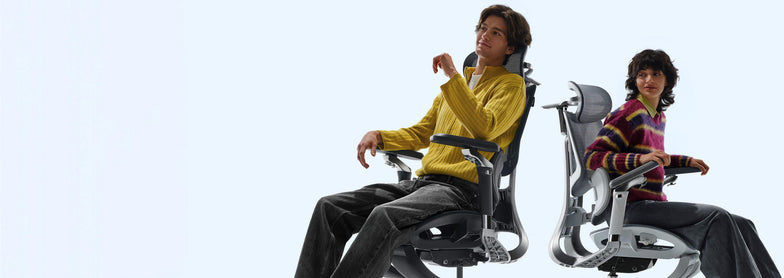 New Product Launch: HBADA E3 Air vs E3 Pro 2026 Edition — Full Breakdown
Introduction
Picking the right ergonomic chair can be tough. Many chairs claim to be comfortable but don’t hold up during long hours of sitting. The new HBADA E3 Air and E3 Pro 2026 models address these issues with precise ergonomics, adaptive support, and a design that saves space. This guide will help you decide which model is best for you.
Overview of the HBADA 2026 New Product Line
In 2026, HBADA is focusing on posture correction and spinal health. They use AI-driven ergonomics and designs that move with your body. Both the E3 Air and E3 Pro offer strong lumbar support, but each is made for a different kind of user.
· E3 Pro 2026: Premium performance with advanced ergonomic features
· E3 Air 2026: Lightweight, compact ergonomic chair for small apartments
Both chairs are made to support you during long hours at your computer. However, they differ in how adjustable they are and how much ergonomic support they offer.
Core Differences at a Glance
Product Comparison Table
Target User
Home office, students
Professionals, long-hour users
Lumbar System
Elastic lumbar support
3-zone dynamic lumbar support chair
Adjustment Level
Essential adjustments
Full adaptive system
Armrests
4D adjustable
720° omni-adjustable armrests chair
Weight & Size
Lightweight, compact
Larger, premium build
Smart Features
Manual + assisted
Adaptive lumbar tracking ergonomic chair
Best Use
Small apartments
Long sitting duration (6–10 hours)
Lumbar Support Technology Breakdown
E3 Pro — 3-Zone Dynamic Precision
The E3 Pro stands out for its 3-zone lumbar support system, which means it provides targeted support for your upper, middle, and lower back. This approach helps keep your spine aligned throughout the day rather than focusing on just one area.
Key benefits:
· Continuous spinal alignment
· Reduced lower back pressure
· Adaptive response to posture shifts
With that said, the E3 Pro is a great choice if you spend 8+ hours at your desk each day, such as remote workers or professionals who need reliable support for extended periods.
E3 Air — Essential Ergonomic Support
The E3 Air takes a simpler approach. Instead of multiple adjustment zones, it uses elastic lumbar support to help you maintain good posture without fiddling with many settings.
It performs well for:
· Short to medium work sessions
· Students and remote workers
· Users who prefer minimal setup
Armrest Engineering and Upper Body Support
720° Omni-Adjustable Armrests (E3 Pro)
The E3 Pro features a 720° omni-adjustable armrest chair system. This allows:
· Vertical, horizontal, and rotational movement
· Precise elbow positioning
· Reduced shoulder tension
These ergonomic armrests are especially helpful for reducing shoulder tension and maintaining proper posture, which can make a big difference when you’re typing or using a mouse for hours at a time.
Functional Armrests (E3 Air)
The E3 Air includes 4D adjustable armrests. While less complex, they still support:
· Basic height and depth adjustment
· Comfortable typing posture
· Balanced arm positioning
If you want a practical chair that lets you adjust your armrests for comfortable typing, the E3 Air covers the basics without making things complicated.
Space Efficiency and Design Philosophy
Compact Ergonomic Chair for Small Apartments
If you don’t have much space, the E3 Air has a small footprint. It’s easy to slide under most desks and move around in tight rooms.
· Easy placement under desks
· Better mobility in limited rooms
· Reduced visual clutter
If you live in a U.S. apartment with limited space, this model fits seamlessly into your setup.
Premium Structure for Stability (E3 Pro)
The E3 Pro prioritizes performance over compactness. Its structure supports:
· Enhanced durability
· Full-body ergonomic alignment
· Stability during reclining
The E3 Pro is better if you have a dedicated home office or workspace with enough room for a larger, sturdier chair.
Smart Ergonomics and Adaptive Technology
Adaptive Lumbar Tracking (E3 Pro)
The E3 Pro introduces adaptive lumbar tracking ergonomic chair technology. It automatically adjusts based on your posture.
This results in:
· Continuous support without manual changes
· Improved posture correction and spinal health
· Reduced fatigue over long sessions
Assisted Ergonomics (E3 Air)
The E3 Air, by comparison, relies on manual adjustments. While it doesn’t have the same level of automation, you can still get solid ergonomic support as long as you take a few minutes to set it up to fit your body.
Which Is the Best Ergonomic Chair for Your Needs?
Choose E3 Pro If You Need:
· The best ergonomic chair for long hours
· Advanced posture correction
· Premium / advanced ergonomic features
· Full adjustability and automation
This model is built for users who prioritize performance and long-term spinal health.
Choose E3 Air If You Need:
· A compact ergonomic chair for small apartments
· Lightweight and easy-to-move design
· Reliable ergonomic support without complexity
· A straightforward solution for your home and office
Practical Setup Tips for Maximum Benefit
To get the most from either chair:
· Adjust the seat height so your feet stay flat on the floor.
· Align lumbar support with your lower back.
· Set armrests to keep elbows at 90 degrees.
· Position your screen at eye level.
Following these steps will help you get the most out of your chair and maintain proper posture, no matter which model you choose.
Common Buying Mistakes to Avoid
· Choosing based on appearance instead of ergonomics
· Ignoring lumbar support quality
· Overlooking armrest adjustability
· Buying oversized chairs for small spaces
· Not adjusting the chair after purchase.
Even the best chair will fail if improperly selected or configured.
FAQ
Q: What is the main difference between HBADA E3 Air vs E3 Pro?
A: The E3 Pro offers advanced features such as 3-zone lumbar support and adaptive tracking, while the E3 Air focuses on simplicity and a compact design. The Pro is better for long hours, while the Air suits smaller spaces and lighter use.
Q: Is the E3 Pro worth it for long sitting durations?
A: Yes. Its adaptive lumbar system and advanced adjustability provide continuous support. This reduces fatigue and improves posture during extended work sessions, making it suitable for users who sit for 6–10 hours daily.
Q: Which chair is better for small apartments?
A: The E3 Air is the better choice. Its compact design and lightweight structure make it ideal for limited spaces while still delivering reliable ergonomic support.
Q: Do both chairs support proper posture?
A: Yes. Both models are designed as ergonomic chairs for a correct sitting posture. The difference lies in the support system's level of advancement, with the E3 Pro offering more dynamic adjustments.
Conclusion
The new launch of the HBADA E3 Air vs E3 Pro 2026 delivers two clear paths. One focuses on compact efficiency, the other on advanced ergonomic precision.
If you value simplicity and need to make the most of a small space, the E3 Air is a solid pick. On the other hand, if you’re after maximum support for long workdays, the E3 Pro is worth considering.
Ultimately, think about your daily routine and how you actually use your chair-choosing based on your habits will help you get the most comfort and value out of your investment.
For more information, please click to check:
https://www.hbada.eu/products/e3-air-ergonomic-office-chair
https://www.hbada.eu/products/e3-pro-ergonomic-office-chair
Apr 26, 2026
New Product Launch: HBADA E3 Air vs E3 Pro 2026 Edition — Full Breakdown
Introduction
Picking the right ergonomic chair can be tough. Many chairs claim to be comfortable but don’t hold up during long hours of sitting. The new HBADA E3 Air and E3 Pro 2026 models address these issues with precise ergonomics, adaptive support, and a design that saves space. This guide will help you decide which model is best for you.
Overview of the HBADA 2026 New Product Line
In 2026, HBADA is focusing on posture correction and spinal health. They use AI-driven ergonomics and designs that move with your body. Both the E3 Air and E3 Pro offer strong lumbar support, but each is made for a different kind of user.
· E3 Pro 2026: Premium performance with advanced ergonomic features
· E3 Air 2026: Lightweight, compact ergonomic chair for small apartments
Both chairs are made to support you during long hours at your computer. However, they differ in how adjustable they are and how much ergonomic support they offer.
Core Differences at a Glance
Product Comparison Table
Target User
Home office, students
Professionals, long-hour users
Lumbar System
Elastic lumbar support
3-zone dynamic lumbar support chair
Adjustment Level
Essential adjustments
Full adaptive system
Armrests
4D adjustable
720° omni-adjustable armrests chair
Weight & Size
Lightweight, compact
Larger, premium build
Smart Features
Manual + assisted
Adaptive lumbar tracking ergonomic chair
Best Use
Small apartments
Long sitting duration (6–10 hours)
Lumbar Support Technology Breakdown
E3 Pro — 3-Zone Dynamic Precision
The E3 Pro stands out for its 3-zone lumbar support system, which means it provides targeted support for your upper, middle, and lower back. This approach helps keep your spine aligned throughout the day rather than focusing on just one area.
Key benefits:
· Continuous spinal alignment
· Reduced lower back pressure
· Adaptive response to posture shifts
With that said, the E3 Pro is a great choice if you spend 8+ hours at your desk each day, such as remote workers or professionals who need reliable support for extended periods.
E3 Air — Essential Ergonomic Support
The E3 Air takes a simpler approach. Instead of multiple adjustment zones, it uses elastic lumbar support to help you maintain good posture without fiddling with many settings.
It performs well for:
· Short to medium work sessions
· Students and remote workers
· Users who prefer minimal setup
Armrest Engineering and Upper Body Support
720° Omni-Adjustable Armrests (E3 Pro)
The E3 Pro features a 720° omni-adjustable armrest chair system. This allows:
· Vertical, horizontal, and rotational movement
· Precise elbow positioning
· Reduced shoulder tension
These ergonomic armrests are especially helpful for reducing shoulder tension and maintaining proper posture, which can make a big difference when you’re typing or using a mouse for hours at a time.
Functional Armrests (E3 Air)
The E3 Air includes 4D adjustable armrests. While less complex, they still support:
· Basic height and depth adjustment
· Comfortable typing posture
· Balanced arm positioning
If you want a practical chair that lets you adjust your armrests for comfortable typing, the E3 Air covers the basics without making things complicated.
Space Efficiency and Design Philosophy
Compact Ergonomic Chair for Small Apartments
If you don’t have much space, the E3 Air has a small footprint. It’s easy to slide under most desks and move around in tight rooms.
· Easy placement under desks
· Better mobility in limited rooms
· Reduced visual clutter
If you live in a U.S. apartment with limited space, this model fits seamlessly into your setup.
Premium Structure for Stability (E3 Pro)
The E3 Pro prioritizes performance over compactness. Its structure supports:
· Enhanced durability
· Full-body ergonomic alignment
· Stability during reclining
The E3 Pro is better if you have a dedicated home office or workspace with enough room for a larger, sturdier chair.
Smart Ergonomics and Adaptive Technology
Adaptive Lumbar Tracking (E3 Pro)
The E3 Pro introduces adaptive lumbar tracking ergonomic chair technology. It automatically adjusts based on your posture.
This results in:
· Continuous support without manual changes
· Improved posture correction and spinal health
· Reduced fatigue over long sessions
Assisted Ergonomics (E3 Air)
The E3 Air, by comparison, relies on manual adjustments. While it doesn’t have the same level of automation, you can still get solid ergonomic support as long as you take a few minutes to set it up to fit your body.
Which Is the Best Ergonomic Chair for Your Needs?
Choose E3 Pro If You Need:
· The best ergonomic chair for long hours
· Advanced posture correction
· Premium / advanced ergonomic features
· Full adjustability and automation
This model is built for users who prioritize performance and long-term spinal health.
Choose E3 Air If You Need:
· A compact ergonomic chair for small apartments
· Lightweight and easy-to-move design
· Reliable ergonomic support without complexity
· A straightforward solution for your home and office
Practical Setup Tips for Maximum Benefit
To get the most from either chair:
· Adjust the seat height so your feet stay flat on the floor.
· Align lumbar support with your lower back.
· Set armrests to keep elbows at 90 degrees.
· Position your screen at eye level.
Following these steps will help you get the most out of your chair and maintain proper posture, no matter which model you choose.
Common Buying Mistakes to Avoid
· Choosing based on appearance instead of ergonomics
· Ignoring lumbar support quality
· Overlooking armrest adjustability
· Buying oversized chairs for small spaces
· Not adjusting the chair after purchase.
Even the best chair will fail if improperly selected or configured.
FAQ
Q: What is the main difference between HBADA E3 Air vs E3 Pro?
A: The E3 Pro offers advanced features such as 3-zone lumbar support and adaptive tracking, while the E3 Air focuses on simplicity and a compact design. The Pro is better for long hours, while the Air suits smaller spaces and lighter use.
Q: Is the E3 Pro worth it for long sitting durations?
A: Yes. Its adaptive lumbar system and advanced adjustability provide continuous support. This reduces fatigue and improves posture during extended work sessions, making it suitable for users who sit for 6–10 hours daily.
Q: Which chair is better for small apartments?
A: The E3 Air is the better choice. Its compact design and lightweight structure make it ideal for limited spaces while still delivering reliable ergonomic support.
Q: Do both chairs support proper posture?
A: Yes. Both models are designed as ergonomic chairs for a correct sitting posture. The difference lies in the support system's level of advancement, with the E3 Pro offering more dynamic adjustments.
Conclusion
The new launch of the HBADA E3 Air vs E3 Pro 2026 delivers two clear paths. One focuses on compact efficiency, the other on advanced ergonomic precision.
If you value simplicity and need to make the most of a small space, the E3 Air is a solid pick. On the other hand, if you’re after maximum support for long workdays, the E3 Pro is worth considering.
Ultimately, think about your daily routine and how you actually use your chair-choosing based on your habits will help you get the most comfort and value out of your investment.
For more information, please click to check:
https://www.hbada.eu/products/e3-air-ergonomic-office-chair
https://www.hbada.eu/products/e3-pro-ergonomic-office-chair
Apr 26, 2026
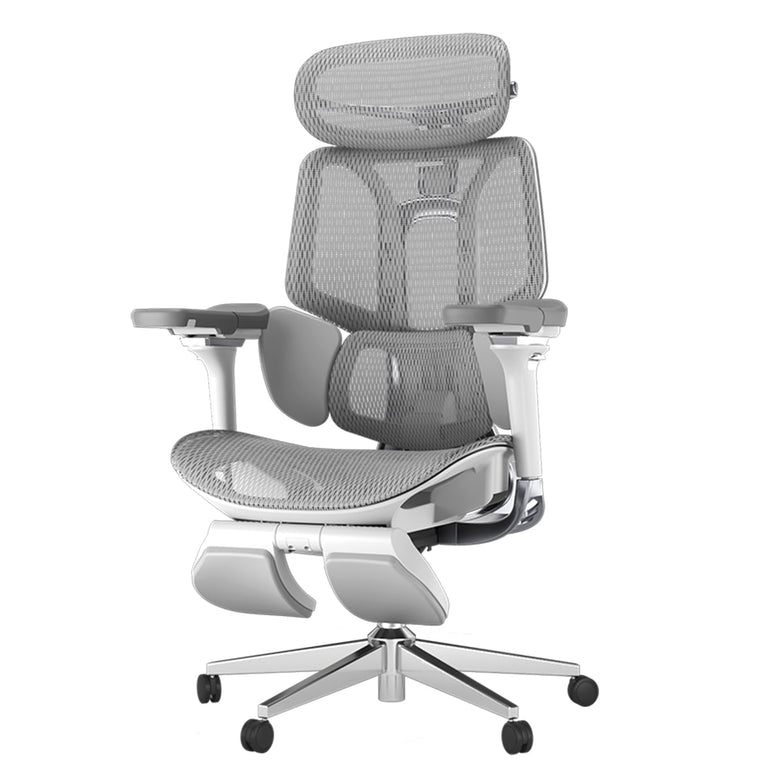 Hbada E3 Ergonomischer Bürostuhl: 17 Jahre ergonomische Spitzenleistung für euren Rücken
Wer lange an seinem Schreibtisch sitzt, setzt sich einem Risiko erhöhter Rücken- und Nackenschmerzen aus. Ein guter Bürostuhl kann dabei wahre Wunder helfen, da er entlastend wirkt und somit die drei Arten von Schmerzen infolge von langem Sitzen verringert. Der Hbada E3 Ergonomic Office Chair ist ein innovativer ergonomischer Bürostuhl, der genau dazu in der Lage ist. Er punktet nicht nur mit einem hohen Komfort, sondern auch mit innovativen Funktionen, die Nacken, Taille und Schulter entlasten.
Hbada E3 Ergonomic Office Chair: Der innovative Bürostuhl
Hbada ist eine professionelle, auf technologische Innovation ausgerichtete Marke für das Gesundheitswesen. Durch die Anwendung neuer Technologien und Materialien bietet Hbada bereits seit 16 Jahren seinen Kunden weltweit professionell gestaltete ergonomische Produkte und Lösungen, die die körperlichen und gesundheitlichen Bedingungen verbessern.
Eine dieser innovativen Lösungen ist der Hbada E3, der mit nur einer einzigen Anpassungen dabei hilft, die drei typischen Arten von Schmerzen bei langem Sitzen zu verringern: Nacken-, Taillen und Schulterschmerzen.
Ermöglicht wird das durch das einzigartige T-förmige Stützsystem des E3, das individuell an den Körper der Nutzerin beziehungsweise des Nutzers angepasst werden kann. Eine elastische Dreizonen-Lendenwirbelstütze sorgt dabei für einen hohen Komfort, auch an den längsten Arbeitstagen.
Der Hbada E3 Ergonomic Office Chair sorgt für einen unvergleichlichen Komfort. (Bild: Hbada)
Die Lendenwirbelstütze ist 8-fach verstellbar. So lassen sich die seitlichen Flügel um bis zu 140 Grad nach innen und außen drehen, während die Lordosenstütze um bis zu 14 Grad angepasst werden kann. Außerdem könnt ihr die Polsterung nach vorne und hinten, sowie nach oben und unten justieren und so an euren individuellen Körper anpassen.
4D-Kopfstütze im Hbada E3 Ergonomic Office Chair
Um den Kopf und Nacken zu entlasten, verfügt der Hbada E3 Ergonomic Office Chair über eine 4D-Kopfstütze, die punktgenau an verschiedene Körpergrößen und Sitzhaltungen angepasst werden kann.
Egal ob ihr euch nach vorne beugt, aufrecht sitzt oder euch bequem zurücklehnt: Die Kopfstütze stellt immer sicher, dass der Nacken entlastet wird, was Nacken- und Kopfschmerzen vorbeugt. So lässt sich der Rahmen der Stütze um bis zu 70 Grad drehen und neigen, nach oben und unten justieren und um 2,2 Zoll nach vorne oder hinten anpassen, um so jeder Sitzhaltung und Körperbewegung gewachsen zu sein.
Die 4D-Kopfstütze lässt sich individuell einstellen (Bild: Hbada)
Die Armlehnen sind natürlich ebenfalls von entscheidender Bedeutung für den Komfort eines Stuhls. So setzt der E3 sogar auf mechanische 6D-Armlehnen, die nicht nur in der Höhe verstellt, nach vorne und hinten, sowie links und rechts bewegt werden können, sondern auch in drei Stufen drehbar und um 6 Grad neigbar sind. Zusätzlich bieten die mechanischen Armlehnen eine Flip-Up-Funktion, mit der sich der vordere Teil um bis zu 40 Grad anwinkeln lässt. Perfekt, um entspannt ein Buch zu lesen, das Smartphone zu bedienen oder auf dem Tablet Einstellungen vorzunehmen.
Hochelastisches Mesh-Gewebe mit adaptivem, schwerkraftabhängigem Fahrgestell
Der Hbada E3 Ergonomic Office Chair ist mit hochelastischem Mesh-Stoff ausgestattet, der dafür sorgt, dass ihr im Sommer am Schreibtisch nicht schwitzt. Gleichzeitig entlastet der Stoff die Beine und beugt so einem Taubheitsgefühl vor.
Der E3 besteht zu 16,5 Prozent aus atmungsaktivem Mesh, der einen höchstmöglichen Komfort mit einer dauerhaften Unterstützung beim Sitzen kombiniert. Nylon und Garn sorgen für einen hervorragenden Halt.
Bild: Hbada
Zusätzlich verfügt der ergonomische Bürostuhl über ein Gestell mit automatischer Schwerkrafterkennung. Ein verbauter Sensor erkennt intuitiv Veränderungen im Gewicht und in der Körperhaltung des Benutzers und passt unter anderem den Widerstand beim Kippen des E3 automatisch an. Das ermöglicht nicht nur einen konstant hohen Sitzkomfort sondern sorgt auch dafür, dass sich der Bürostuhl schnell und mühelos in eine gerade Position zurückbewegt.
Rückenlehne um 140 Grad neigbar
Außerdem ist der Hbada E3 in der Lage, die Rückenlehne um bis zu 140 Grad nach hinten anzuwinkeln. Diese Position ist ideal für ein Nickerchen oder zum Entspannen und erlaubt so eine bequeme Platzierung für tiefe Ruhe.
Bild: Hbada
Unterstützt wird dies durch die integrierte und weich gepolsterte Fußstütze, die den Komfort beim Zurücklehnen erhöht und so eine angenehm weiche Fläche für den ganzen Körper bildet. Das robuste Gestell des Hbada E3 Ergonomic Office Chair stellt dabei sicher, dass auch in der liegenden Position zurückgelehnt für maximale Sicherheit und Stabilität gesorgt ist.
Qualität bis ins kleinste Detail
Der Hbada E3 Ergonomic Office Chair ist bis ins kleinste Detail durchdacht und hochwertig verarbeitet. So setzt der Bürostuhl auf eine SGS Klasse-4-Gasfeder, die unter härtesten Bedingungen in über 120.000 Zyklen getestet wurde und so maximale Sicherheit und Zuverlässigkeit garantiert.
Die Laufrollen verüfgen über besonders leise Räder, die beim Arbeiten oder Konzentrieren nicht ablenken, da sie auch bei Bewegungen des Stuhls nahezu unhörbar über sämtliche Oberflächen gleiten und enorm sanft rollen.
Bild: Hbada
Due Basis des E3 besteht auf einem hochwertigen Stahlsockel, der ein besonders hohes Gewicht von bis zu ca. 136 kg (300 Pfund) tragen kann und dabei duch seine verbesserte Haltbarkeit und Stabilität überzeugt.
Jul 08, 2025
Hbada E3 Ergonomischer Bürostuhl: 17 Jahre ergonomische Spitzenleistung für euren Rücken
Wer lange an seinem Schreibtisch sitzt, setzt sich einem Risiko erhöhter Rücken- und Nackenschmerzen aus. Ein guter Bürostuhl kann dabei wahre Wunder helfen, da er entlastend wirkt und somit die drei Arten von Schmerzen infolge von langem Sitzen verringert. Der Hbada E3 Ergonomic Office Chair ist ein innovativer ergonomischer Bürostuhl, der genau dazu in der Lage ist. Er punktet nicht nur mit einem hohen Komfort, sondern auch mit innovativen Funktionen, die Nacken, Taille und Schulter entlasten.
Hbada E3 Ergonomic Office Chair: Der innovative Bürostuhl
Hbada ist eine professionelle, auf technologische Innovation ausgerichtete Marke für das Gesundheitswesen. Durch die Anwendung neuer Technologien und Materialien bietet Hbada bereits seit 16 Jahren seinen Kunden weltweit professionell gestaltete ergonomische Produkte und Lösungen, die die körperlichen und gesundheitlichen Bedingungen verbessern.
Eine dieser innovativen Lösungen ist der Hbada E3, der mit nur einer einzigen Anpassungen dabei hilft, die drei typischen Arten von Schmerzen bei langem Sitzen zu verringern: Nacken-, Taillen und Schulterschmerzen.
Ermöglicht wird das durch das einzigartige T-förmige Stützsystem des E3, das individuell an den Körper der Nutzerin beziehungsweise des Nutzers angepasst werden kann. Eine elastische Dreizonen-Lendenwirbelstütze sorgt dabei für einen hohen Komfort, auch an den längsten Arbeitstagen.
Der Hbada E3 Ergonomic Office Chair sorgt für einen unvergleichlichen Komfort. (Bild: Hbada)
Die Lendenwirbelstütze ist 8-fach verstellbar. So lassen sich die seitlichen Flügel um bis zu 140 Grad nach innen und außen drehen, während die Lordosenstütze um bis zu 14 Grad angepasst werden kann. Außerdem könnt ihr die Polsterung nach vorne und hinten, sowie nach oben und unten justieren und so an euren individuellen Körper anpassen.
4D-Kopfstütze im Hbada E3 Ergonomic Office Chair
Um den Kopf und Nacken zu entlasten, verfügt der Hbada E3 Ergonomic Office Chair über eine 4D-Kopfstütze, die punktgenau an verschiedene Körpergrößen und Sitzhaltungen angepasst werden kann.
Egal ob ihr euch nach vorne beugt, aufrecht sitzt oder euch bequem zurücklehnt: Die Kopfstütze stellt immer sicher, dass der Nacken entlastet wird, was Nacken- und Kopfschmerzen vorbeugt. So lässt sich der Rahmen der Stütze um bis zu 70 Grad drehen und neigen, nach oben und unten justieren und um 2,2 Zoll nach vorne oder hinten anpassen, um so jeder Sitzhaltung und Körperbewegung gewachsen zu sein.
Die 4D-Kopfstütze lässt sich individuell einstellen (Bild: Hbada)
Die Armlehnen sind natürlich ebenfalls von entscheidender Bedeutung für den Komfort eines Stuhls. So setzt der E3 sogar auf mechanische 6D-Armlehnen, die nicht nur in der Höhe verstellt, nach vorne und hinten, sowie links und rechts bewegt werden können, sondern auch in drei Stufen drehbar und um 6 Grad neigbar sind. Zusätzlich bieten die mechanischen Armlehnen eine Flip-Up-Funktion, mit der sich der vordere Teil um bis zu 40 Grad anwinkeln lässt. Perfekt, um entspannt ein Buch zu lesen, das Smartphone zu bedienen oder auf dem Tablet Einstellungen vorzunehmen.
Hochelastisches Mesh-Gewebe mit adaptivem, schwerkraftabhängigem Fahrgestell
Der Hbada E3 Ergonomic Office Chair ist mit hochelastischem Mesh-Stoff ausgestattet, der dafür sorgt, dass ihr im Sommer am Schreibtisch nicht schwitzt. Gleichzeitig entlastet der Stoff die Beine und beugt so einem Taubheitsgefühl vor.
Der E3 besteht zu 16,5 Prozent aus atmungsaktivem Mesh, der einen höchstmöglichen Komfort mit einer dauerhaften Unterstützung beim Sitzen kombiniert. Nylon und Garn sorgen für einen hervorragenden Halt.
Bild: Hbada
Zusätzlich verfügt der ergonomische Bürostuhl über ein Gestell mit automatischer Schwerkrafterkennung. Ein verbauter Sensor erkennt intuitiv Veränderungen im Gewicht und in der Körperhaltung des Benutzers und passt unter anderem den Widerstand beim Kippen des E3 automatisch an. Das ermöglicht nicht nur einen konstant hohen Sitzkomfort sondern sorgt auch dafür, dass sich der Bürostuhl schnell und mühelos in eine gerade Position zurückbewegt.
Rückenlehne um 140 Grad neigbar
Außerdem ist der Hbada E3 in der Lage, die Rückenlehne um bis zu 140 Grad nach hinten anzuwinkeln. Diese Position ist ideal für ein Nickerchen oder zum Entspannen und erlaubt so eine bequeme Platzierung für tiefe Ruhe.
Bild: Hbada
Unterstützt wird dies durch die integrierte und weich gepolsterte Fußstütze, die den Komfort beim Zurücklehnen erhöht und so eine angenehm weiche Fläche für den ganzen Körper bildet. Das robuste Gestell des Hbada E3 Ergonomic Office Chair stellt dabei sicher, dass auch in der liegenden Position zurückgelehnt für maximale Sicherheit und Stabilität gesorgt ist.
Qualität bis ins kleinste Detail
Der Hbada E3 Ergonomic Office Chair ist bis ins kleinste Detail durchdacht und hochwertig verarbeitet. So setzt der Bürostuhl auf eine SGS Klasse-4-Gasfeder, die unter härtesten Bedingungen in über 120.000 Zyklen getestet wurde und so maximale Sicherheit und Zuverlässigkeit garantiert.
Die Laufrollen verüfgen über besonders leise Räder, die beim Arbeiten oder Konzentrieren nicht ablenken, da sie auch bei Bewegungen des Stuhls nahezu unhörbar über sämtliche Oberflächen gleiten und enorm sanft rollen.
Bild: Hbada
Due Basis des E3 besteht auf einem hochwertigen Stahlsockel, der ein besonders hohes Gewicht von bis zu ca. 136 kg (300 Pfund) tragen kann und dabei duch seine verbesserte Haltbarkeit und Stabilität überzeugt.
Jul 08, 2025